Dialogflow Chatbot: A Quick Beginner’s Guide

 Total View: 249
Submitting the form below will ensure a prompt response from us.
A Dialogflow chatbot is a conversational agent built using Google’s natural language understanding (NLU) platform, Dialogflow ES or CX. It allows developers to create smart, context-aware chatbots that understand user messages, extract meaning, and respond naturally.
Dialogflow powers chatbots for websites, mobile apps, call centers, WhatsApp, and Google Assistant.
How Does a Dialogflow Chatbot Work?
A Dialogflow chatbot processes text or voice using three main components:
Intents
An intent represents what the user wants.
Example:
- “Book a ticket” → BookTicketIntent
- “What’s the weather?” → WeatherIntent
Entities
Entities extract specific information from user messages.
Examples:
- Dates
- Locations
- Ticket types
If a user says:
“Book a flight to London tomorrow”
Dialogflow extracts:
- Location: London
- Date: tomorrow
Fulfillment
- Fulfillment connects the chatbot to backend APIs or databases.
- This is where you write server-side code (Node.js, Python, etc.) to fetch data or perform actions.
Why Use a Dialogflow Chatbot?
Natural Language Understanding (NLU)
Dialogflow uses Google’s ML models to accurately interpret intent.
Multi-channel Support
Deploy your bot directly to:
- Web
- Facebook Messenger
- Slack
- Telegram
- Google Assistant
Context Handling
Dialogflow tracks conversation flow better than simple rule-based bots.
Rapid Development
The UI is intuitive, allowing you to create intents and responses quickly.
Dialogflow Chatbot Workflow
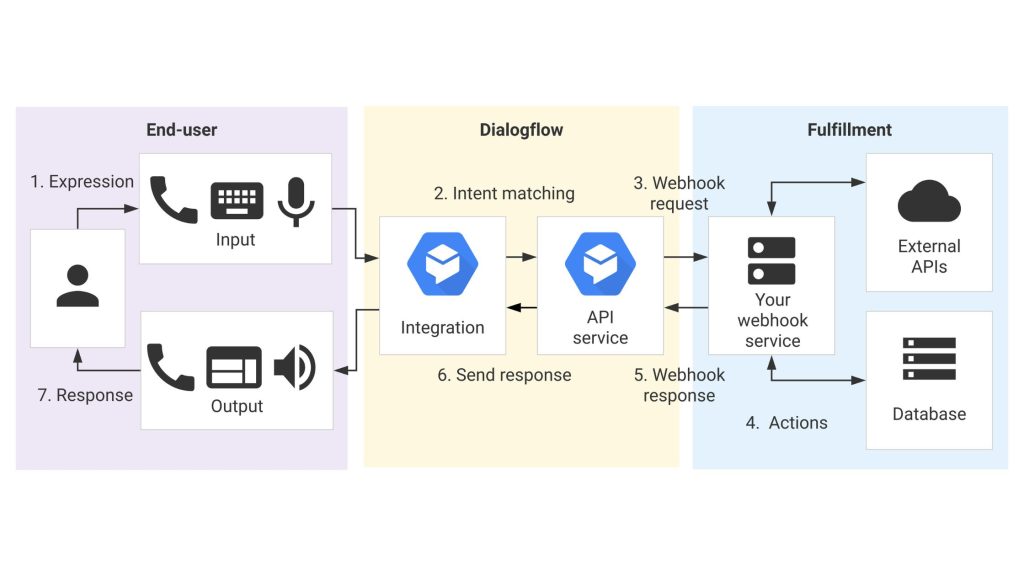
A Dialogflow chatbot works by detecting user intent, extracting key data through entities, and triggering fulfillment for backend actions. The system then processes the response and sends it back to the user in real time, making it suitable for building a multilingual chatbot across platforms. This flow ensures fast, accurate, and context-aware conversations for users worldwide.
How to Build a Dialogflow Chatbot (Step-by-Step)?
Step 1: Create a Dialogflow Agent
- Visit the Dialogflow console
- Create a new agent
- Set language & timezone
- Link Google Project
Step 2: Add Your Intents
Example intents:
- Greeting
- FAQ
- Booking
- Support Request
Provide example training phrases like:
- “Hi”
- “Hello”
- “Good morning”
Dialogflow automatically learns variations.
Step 3: Add Entities
For a booking chatbot, create entities such as:
- @location
- @date
- @service
- @category
Step 4: Enable Fulfillment
Here’s a Python webhook example for Dialogflow ES using Flask:
from flask import Flask, request, jsonify

app = Flask(__name__)

@app.route('/webhook', methods=['POST'])
def webhook():
    req = request.get_json()
    intent = req['queryResult']['intent']['displayName']

    if intent == 'WeatherIntent':
        city = req['queryResult']['parameters'].get('geo-city')
        reply = f"The weather in {city} is sunny today."
        return jsonify({'fulfillmentText': reply})

    return jsonify({'fulfillmentText': "I'm not sure, please try again."})

if __name__ == '__main__':
    app.run(port=5000, debug=True)
How to Connect It
- Deploy this script (using ngrok or cloud hosting).
- Paste the URL under Fulfillment → Webhook URL in Dialogflow.
- Enable webhook for specific intents.
Step 5: Test and Deploy the Chatbot
Dialogflow offers a built-in test console.
Then deploy the bot to:
- Website via Dialogflow Messenger
- WhatsApp (Twilio)
- Messenger
- Slack
Dialogflow Chatbot Use Cases
Customer Support
Automate FAQs, troubleshooting, and ticket creation.
E-commerce
Guide users through product search, order tracking, and returns.
Healthcare
Appointment booking, medical FAQs, symptom triage.
Banking
Balance inquiries, fraud alerts, transaction updates.
HR & Internal Tools
Policy questions, leave management, and onboarding support.
Advantages of a Dialogflow Chatbot
| Feature | What it Does | Benefit |
|---|---|---|
| NLU Engine | Understands user intent from natural language | High intent accuracy |
| Multi-channel | Supports multiple deployment platforms | Deploy anywhere |
| Prebuilt templates | Offers ready-made bot structures | Faster development |
| Context management | Maintains conversation flow across messages | Handles multi-turn dialogs |
| API support | Connects with external systems and services | Build advanced workflows |
Build Your First Dialogflow Chatbot
Start creating intelligent conversational experiences with Google Dialogflow today.
Final Thoughts
A Dialogflow chatbot is one of the fastest and most powerful ways to build conversational AI with minimal coding. Its combination of NLU, integration flexibility, and multi-channel deployment makes it ideal for both beginners and enterprises.
If you’re building your first chatbot or upgrading an existing one, Dialogflow is a strong, scalable choice.

Jayanti Katariya is the CEO of BigDataCentric, a leading provider of AI, machine learning, data science, and business intelligence solutions. With 18+ years of industry experience, he has been at the forefront of helping businesses unlock growth through data-driven insights. Passionate about developing creative technology solutions from a young age, he pursued an engineering degree to further this interest. Under his leadership, BigDataCentric delivers tailored AI and analytics solutions to optimize business processes. His expertise drives innovation in data science, enabling organizations to make smarter, data-backed decisions.