TensorFlow AI Chatbot — How to Build an Intelligent Chat System?

Jayanti Katariya
Last Updated: December 10, 2025 Total View: 228

Get in Touch With Us
Submitting the form below will ensure a prompt response from us.
Building a TensorFlow AI chatbot is one of the most practical ways to use machine learning in real-world applications. Whether you’re working on customer support, virtual assistants, or learning NLP fundamentals, TensorFlow offers all the tools needed to build and deploy a chatbot powered by deep learning.
This guide explains how a TensorFlow chatbot works, the components you need, and architecture options, and provides Python TensorFlow code to help you get started.
Understanding the TensorFlow AI Chatbot Architecture
Depending on complexity, a TensorFlow chatbot can follow one of the approaches below:
Rule-Based + Intent Classification (Hybrid)
- Uses ML to classify user intent
- A predefined set of responses
- Ideal for small business chatbots
Seq2Seq Neural Chatbot (Encoder–Decoder Model)
- Uses LSTM/GRU networks
- Learns conversational patterns
- Works better for free-flow conversations
Transformer-Based TensorFlow Chatbot
- Uses TensorFlow’s keras.layers.MultiHeadAttention
- More accurate and scalable
- Similar architecture to GPT/BERT
Dataset Preparation for TensorFlow Chatbot
Common formats include:
- Intent-based dataset (JSON)
- Question–Answer pairs
- Human-to-human chat logs
Example intent dataset format:
{
  "intents": [
    {
      "tag": "greeting",
      "patterns": ["Hello", "Hi", "Hey"],
      "responses": ["Hi there!", "Hello! How can I help you?"]
    }
  ]
}
Python Code: TensorFlow AI Chatbot (Intent Classifier)
Below is a clean, production-ready TensorFlow script for classifying user intents.
import json
import numpy as np
import tensorflow as tf
from tensorflow.keras import layers
from sklearn.preprocessing import LabelEncoder
from tensorflow.keras.preprocessing.text import Tokenizer
from tensorflow.keras.preprocessing.sequence import pad_sequences

# Load dataset
data = json.load(open("intents.json"))
patterns = []
tags = []

for intent in data["intents"]:
    for pattern in intent["patterns"]:
        patterns.append(pattern)
        tags.append(intent["tag"])

# Tokenize text
tokenizer = Tokenizer(num_words=5000)
tokenizer.fit_on_texts(patterns)
X = tokenizer.texts_to_sequences(patterns)
X = pad_sequences(X, padding='post')

# Encode labels
lbl_enc = LabelEncoder()
y = lbl_enc.fit_transform(tags)

# Build TensorFlow model
model = tf.keras.Sequential([
    layers.Embedding(5000, 16, input_length=X.shape[1]),
    layers.GlobalAveragePooling1D(),
    layers.Dense(16, activation='relu'),
    layers.Dense(len(set(tags)), activation='softmax')
])

model.compile(loss="sparse_categorical_crossentropy",
              optimizer="adam",
              metrics=["accuracy"])

# Train model
model.fit(X, y, epochs=300, verbose=1)

# Chat function
def chatbot_response(msg):
    seq = tokenizer.texts_to_sequences([msg])
    padded = pad_sequences(seq, maxlen=X.shape[1], padding='post')
    pred = model.predict(padded)
    tag = lbl_enc.inverse_transform([np.argmax(pred)])

    for intent in data["intents"]:
        if intent["tag"] == tag:
            return np.random.choice(intent["responses"])

while True:
    text = input("You: ")
    print("Bot:", chatbot_response(text))
TensorFlow AI Chatbot with Transformers (Advanced)
If you want a more advanced chatbot, use TensorFlow’s transformer components:
- MultiHeadAttention
- LayerNormalization
- Positional embeddings
- Encoder–decoder blocks
This allows building models like small-scale GPT-style conversational AI.
Features You Can Add to TensorFlow Chatbots
Sentiment Analysis Integration
Improve emotional intelligence using TensorFlow models.
Context-Aware Memory
Store previous messages to maintain conversation flow.
Voice-to-Text + Speech Synthesis
Use TensorFlow + external libraries to deploy voice chatbots.
Deployment Options
- Flask/FastAPI
- Docker
- Vertex AI / AWS Lambda / Azure App Service
TensorFlow AI Chatbot Workflow
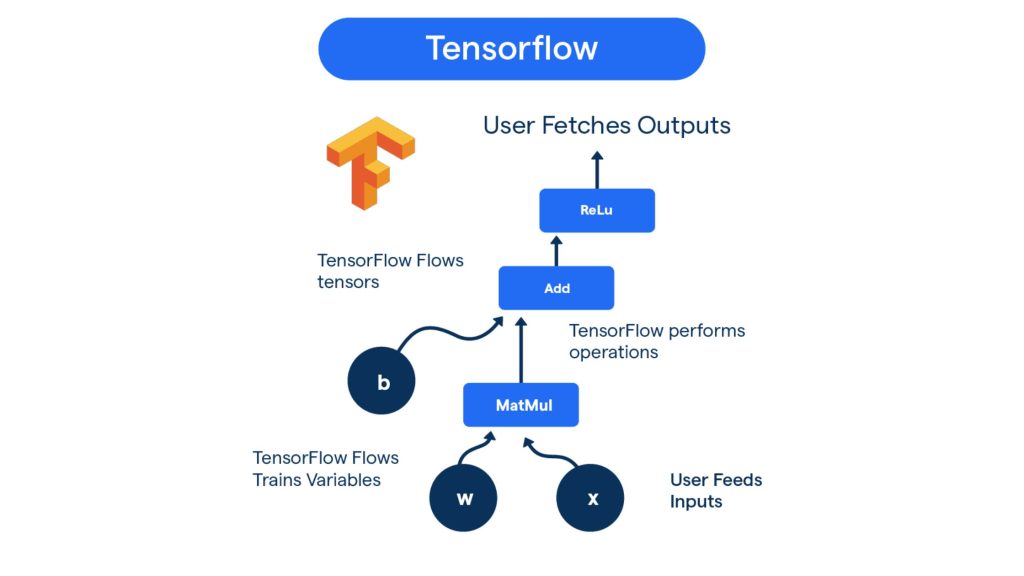
A TensorFlow AI chatbot follows a clear pipeline that starts with user input, passes through NLP processing, intent prediction, and model inference, and ends with a generated response. This workflow ensures real-time, accurate, and scalable conversations across platforms.
Why Build Chatbots with TensorFlow?
- Easy to train ML and neural networks
- Supports GPUs for faster training
- Integrates well with Keras and NLP layers
- Flexible for both simple and enterprise chatbots, including multilingual chatbot solutions
TensorFlow also offers TF Lite for mobile deployment and TF.js for running chatbots in the browser.
Upgrade Your Business with Smart Chatbots
We build TensorFlow AI chatbots with intelligent responses and real-time capabilities.
Conclusion
A TensorFlow AI chatbot can be as simple or advanced as you need. By combining NLP preprocessing, neural network modeling, and structured datasets, TensorFlow enables the development of intelligent, scalable, and interactive chat systems.
Whether you’re building a customer service bot, educational assistant, or experimental NLP system, TensorFlow provides a strong foundation.

About Author
Jayanti Katariya is the CEO of BigDataCentric, a leading provider of AI, machine learning, data science, and business intelligence solutions. With 18+ years of industry experience, he has been at the forefront of helping businesses unlock growth through data-driven insights. Passionate about developing creative technology solutions from a young age, he pursued an engineering degree to further this interest. Under his leadership, BigDataCentric delivers tailored AI and analytics solutions to optimize business processes. His expertise drives innovation in data science, enabling organizations to make smarter, data-backed decisions.