
System Integration Examples for Businesses and Their Applications

Last Updated: October 14, 2026
 Total View: 68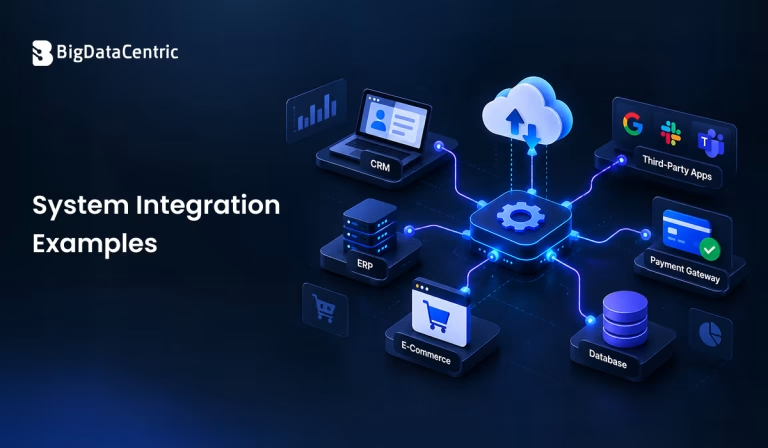
Submitting the form below will ensure a prompt response from us.
System integration connects different software applications, databases, platforms, and IT systems so they can exchange data and work together. Businesses use system integration to automate workflows, reduce manual data entry, improve data consistency, and streamline operations.
Understanding system integration examples helps organizations identify opportunities to connect their existing technology and create more efficient business processes. Common examples include integrating CRM and ERP systems, connecting e-commerce platforms with inventory software, synchronizing payment gateways with accounting applications, and linking business intelligence tools with data warehouses.
What is System Integration?
System integration connects separate systems so they can communicate and share information. Depending on business requirements, integration may involve APIs, middleware, webhooks, database connections, message queues, or enterprise integration platforms.
For example, when a customer places an order on an e-commerce website, the system can automatically send the order details to inventory management, payment processing, shipping, and accounting applications.
Instead of managing each application independently, system integration lets connected components support a coordinated workflow.
What are Some Common System Integration Examples?
Businesses across industries use system integration to connect applications and automate everyday operations.
CRM and ERP Integration
Customer relationship management (CRM) software stores customer interactions, sales activities, and lead information. Enterprise resource planning (ERP) software manages processes such as inventory, finance, procurement, and order fulfillment.
Integrating CRM and ERP systems allows sales and operations teams to share relevant information.
Example: When a salesperson confirms an order in the CRM, the integration sends the order details to the ERP system. The ERP can then manage inventory availability, invoicing, and fulfillment.
Benefits:
- Reduces duplicate data entry
- Improves customer and order visibility
- Connects sales activities with operational processes
- Helps teams access consistent information
E-Commerce and Inventory Integration
Online retailers often connect their e-commerce platforms with inventory management systems.
Example: A customer purchases a product through an online store. The integration updates inventory levels, sends the order to the fulfillment system, and can trigger a notification when stock is running low.
This helps businesses maintain more accurate stock information across sales channels and reduces the risk of accepting orders for unavailable products.
Payment Gateway and Accounting Integration
Businesses can integrate payment gateways with accounting or financial management software to synchronize transaction information.
Example: When a customer completes a payment, transaction details are sent to the accounting system for reconciliation and reporting.
The integration can reduce manual bookkeeping, improve transaction tracking, and help finance teams identify discrepancies. Refunds, chargebacks, and payment fees may require additional handling to keep records accurate.
Marketing Automation and CRM Integration
Marketing automation platforms can connect with CRM systems to share lead information, campaign engagement, and customer lifecycle data.
Example: When a prospect submits a website form, the integration creates or updates a CRM record. The marketing platform can then send relevant follow-up communications based on the prospect’s preferences and interactions.
This helps sales and marketing teams coordinate campaigns, qualify leads, and track conversion performance.
HR and Payroll System Integration
Human resource management systems (HRMS) can integrate with payroll software to synchronize employee information.
Example: When an employee joins an organization, approved details such as their employee ID, department, and compensation information can be transferred to the payroll system.
Appropriate validation and access controls help reduce errors and protect sensitive employee data.
Data Warehouse and Business Intelligence Integration
Organizations frequently integrate operational databases, CRM platforms, ERP applications, and other data sources with a central data warehouse.
Example: Sales, inventory, and customer data are collected through scheduled or near-real-time data pipelines. Business intelligence tools then use the consolidated data to create dashboards and reports.
This supports cross-functional analysis, performance monitoring, and data-driven decision-making.
Customer Support and Communication Integration
Customer support platforms can connect with email, live chat, messaging services, and CRM applications.
Example: When a customer submits a support request, the integration creates a ticket, associates it with the relevant customer record, and notifies the assigned support team.
With appropriate configuration, agents can view previous interactions without switching between multiple applications.
IoT Devices and Cloud Platforms
Businesses using Internet of Things (IoT) devices can integrate sensor data with cloud platforms, analytics tools, and operational systems.
Example: Sensors on manufacturing equipment transmit temperature and vibration measurements to a cloud platform. Analytics software identifies unusual patterns and sends alerts to maintenance teams.
This approach can support predictive maintenance, equipment monitoring, and operational efficiency.
How Does System Integration Work?
A system integration project typically follows several steps.
Step 1: Identify Business Requirements
Determine which systems need to communicate, what information must be exchanged, and which business processes should be improved.
Step 2: Select the Integration Method
Choose the appropriate integration approach based on system capabilities, data volume, security requirements, and latency.
Common methods include:
- API integration: Connects applications through defined interfaces.
- Middleware: Coordinates communication between multiple systems.
- Webhooks: Sends event-based notifications when specified actions occur.
- ETL or ELT pipelines: Move and prepare data for analytics or reporting.
- Message queues: Support asynchronous communication between services.
Step 3: Map and Transform Data
Different applications may represent the same information differently. Data mapping and transformation ensure that fields, formats, and identifiers are compatible.
Step 4: Implement Security and Error Handling
Use appropriate authentication, authorization, encryption, logging, and validation. Plan for failed requests, retries, duplicate events, and temporary service outages.
Step 5: Test and Monitor the Integration
Test normal operations, invalid data, high workloads, and failure scenarios. Monitor data synchronization, response times, and integration errors after deployment.
What are the Benefits of System Integration?
Effective system integration can provide several business advantages:
- Greater efficiency: Automates repetitive tasks and reduces manual work.
- Improved data accuracy: Reduces inconsistent records across applications.
- Better visibility: Helps teams access information from connected systems.
- Faster decision-making: Makes relevant operational and analytical data easier to access.
- Scalability: Allows organizations to extend workflows as their systems and requirements grow.
- Enhanced customer experience: Supports more consistent service across sales, payments, fulfillment, and support.
The actual benefits depend on the integration design, source data quality, and how well the connected workflows are managed.
What Challenges Can Occur During System Integration?
System integration can introduce technical and operational challenges.
- Legacy systems: Older applications may lack modern APIs or documentation.
- Data incompatibility: Systems may use different formats, identifiers, or definitions.
- Security risks: Poorly configured integrations can expose sensitive information.
- Integration failures: Network interruptions or application outages can disrupt data exchange.
- Maintenance requirements: API changes and software updates may require ongoing adjustments.
Businesses can face challenges when integrating databases across multiple applications. Database optimization can help improve query performance and ensure efficient data access across connected systems.
Businesses can reduce these risks through clear data ownership, documented interfaces, robust monitoring, appropriate access controls, and regular testing.
Need the Right System Integration Solution?
Connect your business applications with custom system integration solutions that simplify data exchange, automate workflows, and improve operational efficiency.
Conclusion
System integration helps businesses connect applications, automate processes, and improve information flow across departments. From CRM and ERP integration to cloud analytics, payment synchronization, and IoT monitoring, these examples demonstrate how connected systems can support more efficient operations.
Choosing the right integration architecture requires an understanding of business objectives, system compatibility, data quality, security, and future growth. A well-planned approach can help organizations get more value from their existing technology while creating a foundation for further digital transformation.


Jayanti Katariya is the CEO of BigDataCentric, a leading provider of AI, machine learning, data science, and business intelligence solutions. With 18+ years of industry experience, he has been at the forefront of helping businesses unlock growth through data-driven insights. Passionate about developing creative technology solutions from a young age, he pursued an engineering degree to further this interest. Under his leadership, BigDataCentric delivers tailored AI and analytics solutions to optimize business processes. His expertise drives innovation in data science, enabling organizations to make smarter, data-backed decisions.
Latest From Our Q&A
Stay updated with technical insights, industry trends, and the latest technology developments.