

15 Best No-Code AI Agent Platforms to Boost Productivity
Blog Summary:
No-Code AI Agent Platforms are transforming how businesses automate tasks, manage workflows, and build intelligent solutions with less technical effort. From customer support and sales automation to research and data processing, these platforms can help teams improve productivity and reduce repetitive work. By exploring 15 leading platforms and comparing their capabilities, businesses can identify solutions that fit their workflows, integration needs, security requirements, and growth goals.
No-Code AI Agent Platforms are changing how businesses automate tasks, streamline workflows, and build intelligent solutions without extensive programming expertise.
Unlike traditional software that follows predefined instructions, an ai agent can interpret information, make decisions, interact with connected tools, and complete multiple steps with limited human intervention.
The growing adoption of no-code AI agent technology is making AI development more accessible to business teams, marketers, operations professionals, and other non-technical users. The AI Agents market is projected to grow to USD 52.62 billion by 2030, registering a CAGR of 46.3%.
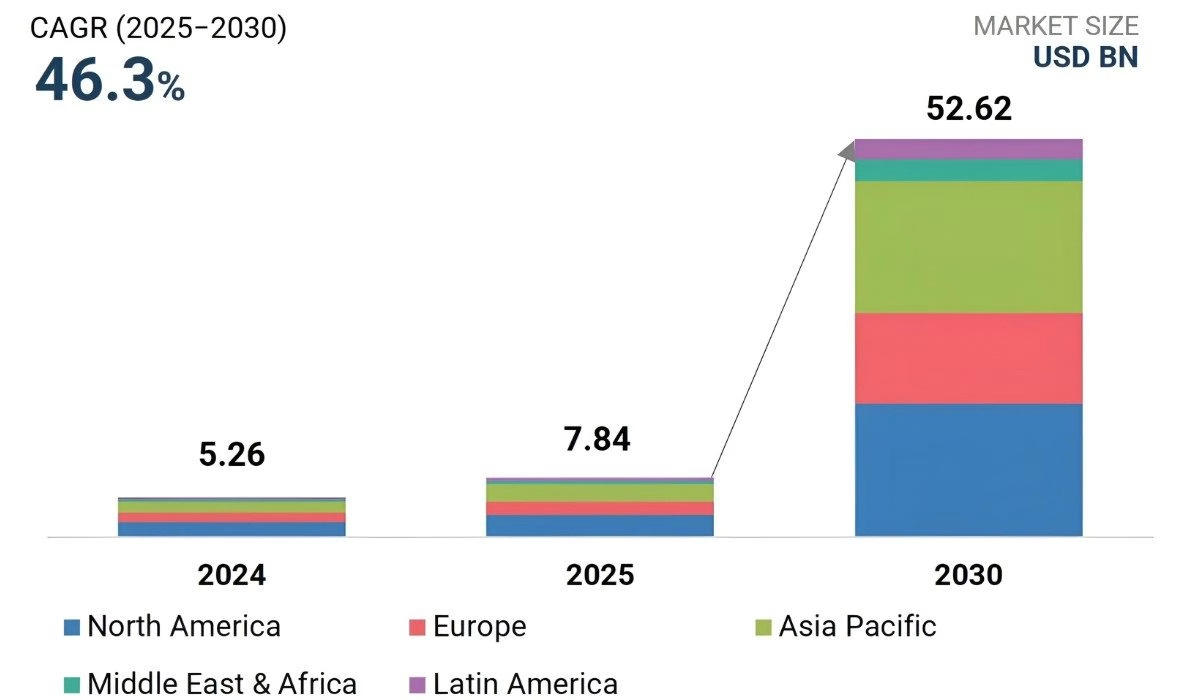
This reflects the increasing demand for AI-powered automation and intelligent business solutions. Instead of building every component from scratch, users can configure workflows, connect applications, provide instructions, and deploy intelligent agents through visual interfaces.
These solutions can support a wide range of business activities, including customer support, sales, lead qualification, marketing, research, data processing, and internal operations.
They can help organizations reduce repetitive manual work while allowing employees to focus on more strategic responsibilities.
For businesses pursuing intelligent digital transformation, these tools can provide a practical way to experiment with AI-powered automation before investing in fully customized development. Teams can test specific use cases, measure results, and refine workflows based on real business requirements.
However, selecting the right solution requires more than comparing features. Businesses need to evaluate ease of use, AI capabilities, integrations and automation, security, scalability, and pricing.
Different platforms serve different purposes, so a tool that works well for conversational AI may not necessarily be the best choice for enterprise workflow automation.
What is a No-Code AI Agent?
A no-code ai agent is an intelligent software system that can understand instructions, process information, make decisions, and perform tasks without requiring traditional programming. Users can configure these agents through visual interfaces, workflows, prompts, and integrations.
Unlike basic chatbots that mainly respond to questions, an ai agent can take actions based on defined goals and business rules.
For example, an agent can qualify leads, answer customer queries, retrieve information from a knowledge base, schedule appointments, or update business applications. Common ai agent examples include customer support assistants, sales agents, research assistants, and internal knowledge assistants.
These agents can be connected with existing business tools to automate repetitive processes and improve operational efficiency. Businesses can configure workflows, set specific instructions, and define actions based on their requirements.
This makes AI easier to adopt across departments without requiring every task to be handled manually.
No-code solutions make AI automation accessible to non-technical teams by reducing development complexity and speeding up experimentation. However, highly customized workflows, complex integrations, and strict enterprise requirements may still require technical development and specialized expertise.
No Code vs Low Code vs Traditional AI Development
The approach used to develop an AI solution can significantly affect development speed, customization, cost, and scalability.
No-code focuses on visual development with minimal technical expertise, low-code combines visual tools with custom coding, while traditional development provides complete control through programming. The table below highlights the key differences.
| Factor | No-Code Development | Low-Code Development | Traditional AI Development |
|---|---|---|---|
| Coding Requirement | Little to none | Some coding | Extensive coding |
| Development Speed | Fast | Moderate to fast | Slower |
| Customization | Limited to moderate | High | Very high |
| Technical Expertise | Low | Moderate | High |
| Flexibility | Moderate | High | Very high |
| Development Cost | Generally lower | Moderate | Generally higher |
| Best For | Quick automation and prototypes | Customized business workflows | Complex enterprise AI solutions |
| Scalability | Platform-dependent | High | Highly customizable |
The right choice depends on your project’s complexity, budget, technical resources, and need for customization. No-code offers speed and simplicity, low-code adds flexibility, while traditional development provides greater control for advanced AI solutions.
Which AI development approach fits your business?
Choose the right balance of speed, flexibility, cost, and scalability for your AI project.
15 Best No-Code AI Agent Platforms 2026
The best No-Code AI Agent Platforms in 2026 offer varying AI capabilities, workflow automation, integrations, customization, and scalability. Some focus on business automation, while others specialize in conversational AI or visual workflows.
The right choice depends on your automation needs and desired level of control.
Quick comparison of key strengths and ideal use cases across platforms:
| Platform | Best For | Key Strength |
|---|---|---|
| Lindy | Business automation | AI assistants and task automation |
| Relevance AI | AI workers | Research, sales, and data workflows |
| Voiceflow | Conversational AI | Visual conversation design |
| Botpress | AI assistants | Knowledge-based conversational workflows |
| Zapier Agents | App automation | Connecting AI with business apps |
| Make | Workflow automation | Multi-step visual workflows |
| n8n | Advanced automation | Flexible and customizable workflows |
| Gumloop | AI automation | Research and data workflows |
| MindStudio | AI applications | Custom AI workflows |
| Microsoft Copilot Studio | Enterprise AI | Microsoft ecosystem integration |
| Dify | AI applications | Models, workflows, and knowledge management |
| Flowise | Visual AI development | Drag-and-drop AI workflows |
| Stack AI | Enterprise AI | Security and workflow management |
| Salesforce Agentforce | CRM automation | Salesforce-based AI processes |
| Relay.app | Human-in-the-loop automation | AI workflows with approvals |
Lindy
Lindy helps businesses create AI-powered assistants for repetitive tasks. Users can build workflows for scheduling, email management, lead qualification, customer support, and daily operations. Its visual interface makes automation easier for teams with limited technical expertise.
Businesses can customize workflows based on their specific requirements. It is suitable for streamlining routine business processes.
Relevance AI
Relevance AI helps businesses build and manage AI workers for different processes. It supports workflows for research, data processing, lead qualification, sales, and marketing activities. Businesses can connect multiple tools and create customized automation workflows.
Its platform helps teams reduce repetitive manual tasks. It is useful for organizations exploring AI-powered business automation.
Voiceflow
Voiceflow is designed for creating conversational AI experiences through a visual builder. Teams can create, test, and deploy customer-facing assistants across different channels. It supports use cases such as customer support, sales, onboarding, and engagement.
Users can design conversation flows without extensive programming. This makes it suitable for teams developing conversational AI solutions.
Botpress
Botpress provides a visual environment for building conversational AI applications. Teams can design conversation flows, connect knowledge sources, integrate external services, and customize assistant behavior. Its visual tools simplify the process of developing interactive AI experiences.
Businesses can create assistants for customer service and other workflows. It offers flexibility while reducing traditional development requirements.
Zapier Agents
Zapier Agents combines AI capabilities with Zapier’s extensive automation ecosystem. Businesses can create intelligent workflows that interact with connected applications and perform tasks based on instructions.
It can connect AI actions with CRM, marketing, productivity, and communication tools. Users can automate repetitive processes across multiple applications. This makes it useful for teams already using workflow automation.
Make
Make provides a visual environment for connecting applications and creating multi-step workflows. Its AI capabilities can process information and trigger actions across connected services. Businesses can design automated processes without building every integration from scratch.
The platform supports workflows across different business functions and applications. It is useful for combining AI with broader business automation.
n8n
n8n is a flexible workflow automation platform for connecting applications, APIs, and AI services. Its visual workflow builder supports sophisticated automation scenarios and provides control over individual workflow steps.
Teams can customize workflows according to their technical and business requirements. It supports a wide range of integrations and automation possibilities. This makes it suitable for more complex AI workflows.
Gumloop
Gumloop focuses on AI-powered workflow automation through a visual interface. Users can create workflows for research, data processing, content operations, and repetitive business activities. The platform helps connect AI capabilities with multiple business applications.
Teams can build and modify workflows without developing every process manually. It is useful for organizations seeking flexible AI automation.
MindStudio
MindStudio enables users to create customized AI applications and workflows through a visual development environment. It supports content generation, research, data analysis, and business automation.
These capabilities can be adapted to areas such as AI-Driven Learning, where customized workflows support intelligent learning experiences. The platform is suitable for organizations exploring AI solutions without traditional development.
Microsoft Copilot Studio
Microsoft Copilot Studio helps organizations create customized AI assistants and business automation experiences. Businesses can connect data, applications, workflows, and enterprise services within the Microsoft ecosystem.
It supports organizations already using Microsoft 365 and related business applications. Teams can configure assistants for different business processes and requirements. This makes it valuable for enterprise-focused AI automation.
Dify
Dify provides a visual environment for developing AI applications, workflows, and knowledge-based experiences. It supports model integration, workflow configuration, knowledge management, and application deployment.
Businesses can experiment with different AI models and create customized workflows. Its visual approach simplifies AI application development and testing. It is useful for teams seeking flexibility in AI implementation.
Flowise
Flowise provides a visual interface for building AI workflows and applications. Its drag-and-drop approach allows users to connect models, data sources, and different workflow components.
Teams can experiment with AI applications without developing every component manually. It supports flexible workflow design for different use cases. This makes it useful for organizations exploring visual AI development.
Stack AI
Stack AI focuses on enterprise-oriented AI application development and workflow automation. Organizations can create workflows that connect AI models with business data and applications.
Its security, governance, and workflow management capabilities support business-focused AI implementations. Teams can build solutions for internal operations and other enterprise use cases. It is suitable for organizations with structured AI requirements.
Salesforce Agentforce
Salesforce Agentforce supports AI-powered business processes within the Salesforce ecosystem. Organizations can use it for customer service, sales, marketing, and other CRM-related activities.
It can work with Salesforce data and existing business workflows to automate routine tasks. Businesses can configure AI-driven processes around their customer operations. It is particularly useful for organizations already using Salesforce.
Relay.app
Relay.app combines workflow automation with AI capabilities through a visual interface. Users can create processes involving human approvals, AI-based actions, and application integrations.
This approach allows businesses to automate tasks while keeping employees involved in important decisions. Teams can design workflows around their specific operational requirements. It is useful for businesses that prefer human oversight within automation.
You Might Also Like:
What Are the Best Generative AI Tools for Business and Content Creation?
When evaluating these No-Code AI Agent Platforms, businesses should consider immediate use cases, long-term requirements, and the balance of simplicity, flexibility, and control. ai agent examples can help identify practical applications, while ai agent frameworks provide context for technical comparisons.
For businesses focused on AI Workflow Automation, the best platform is not necessarily the one with the largest feature list. Instead, organizations should select a solution that fits their existing technology stack, security requirements, workflow complexity, and expected scale.
The next step is to evaluate these factors systematically before choosing a platform.
Is your business ready for smarter AI automation?
Transform repetitive processes into intelligent workflows that improve efficiency, streamline operations, and support long-term business growth.
How to Choose the Right AI Agent Platform?
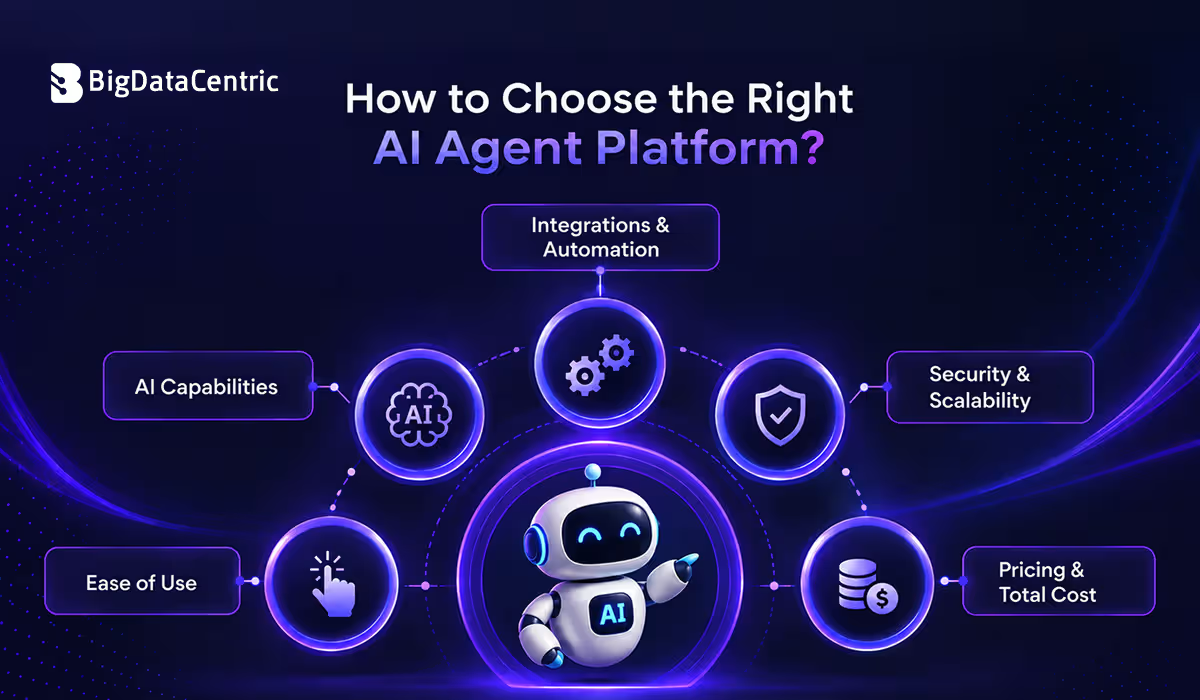
Choosing among No-Code AI Agent Platforms requires evaluating workflows, integrations, security, scalability, and long-term goals. For organizations comparing no code or low code platforms, the right solution should balance simplicity, flexibility, customization, and business requirements.
Ease of Use
A visual interface can significantly reduce the learning curve for teams without extensive programming experience. Businesses should look for intuitive workflow builders, clear configuration options, reusable components, and straightforward deployment processes.
Good usability allows teams to create and modify automations without depending on developers for every small change.
AI Capabilities
The platform should provide AI capabilities that match the intended use case. Businesses may need natural language processing, knowledge retrieval, decision-making, content generation, data analysis, or task execution.
It is important to evaluate how well the platform handles real business scenarios rather than selecting a solution based only on its advertised AI features.
Integrations & Automation
Integrations determine how effectively an AI solution can work with existing business applications. Businesses should check whether the platform supports their CRM, communication tools, databases, productivity applications, APIs, and other systems.
Strong integrations can connect AI-powered tasks with existing workflows and reduce manual data transfer.
Security & Scalability
Security becomes increasingly important when AI workflows process customer information, business documents, internal data, or other sensitive information. Organizations should review authentication, access controls, data handling, monitoring, and governance capabilities.
Scalability should be considered as well, particularly when the number of workflows, users, integrations, or automated tasks is expected to increase.
Pricing & Total Cost
Pricing should be evaluated based on usage and complexity. Businesses should consider subscription plans, usage charges, automation limits, integration costs, and scaling expenses. AI Cost Optimization can help balance platform expenses with performance and business value.
A low starting price does not always remain cost-effective as adoption grows.
A structured evaluation can help businesses identify which platform provides the best balance of usability, functionality, integration, security, scalability, and cost. This approach reduces the risk of selecting a tool based solely on popularity or a long list of features.
Build AI Agents Without Any Code with BigDataCentric
Building an AI solution does not always require a large development team or complex programming from the beginning.
BigDataCentric, an experienced Artificial Intelligence Development Company, helps businesses design and implement customized AI solutions based on their workflows, data, and operational requirements.
BigDataCentric can support businesses with:
- Custom Solution Development: Create AI solutions around specific business requirements and use cases.
- Workflow Integration: Connect AI capabilities with existing business processes to reduce repetitive manual tasks.
- Application Connectivity: Integrate AI solutions with business applications, databases, APIs, and existing technology environments.
- Model Implementation: Select and implement suitable AI models based on project requirements and performance needs.
- Cost Management: Evaluate infrastructure, model usage, and implementation requirements to maintain a practical balance between performance and expenses.
- Scalable Development: Build solutions that can expand as business workflows, users, and automation requirements grow.
Businesses can use these capabilities for customer support, research, sales automation, data analysis, and internal processes. They can start with a focused use case and expand as requirements grow.
For companies evaluating No-Code AI Agent Platforms, BigDataCentric can provide expertise for advanced customization, integrations, and enterprise deployment. Organizations may require ai agent frameworks when greater flexibility and technical control are needed.
The goal is to create AI solutions that deliver measurable value by reducing repetitive work, improving efficiency, and enhancing business processes.
Build Smarter AI Solutions for Your Business
Transform complex processes into scalable AI solutions that improve efficiency, automate repetitive tasks, and support long-term business growth.
Conclusion
No-Code AI Agent Platforms help businesses automate workflows, simplify AI adoption, and build intelligent solutions without extensive programming. The right platform depends on business requirements, integrations, security, scalability, and budget.
With careful evaluation and the right implementation strategy, businesses can use AI Model Optimization to improve efficiency, reduce repetitive work, and support better AI-driven business processes. Choosing the right platform and implementation approach can help organizations achieve sustainable digital growth.
FAQs
What is the best AI agent platform?
The perfect AI agent system is completely based on your requirements, with Microsoft Copilot Studio being the top choice for an enterprise office, Botpress for customer service, and [CrewAI] for developer purposes.
What are the 7 types of AI agents?
The seven types are simple reflex agents, model-based agents, goal-based agents, utility-based agents, learning agents, hierarchical agents, and multi-agent systems.
What are some good low-code AI platforms?
n8n, Make, Dify, Flowise, Stack AI, and Microsoft Copilot Studio are popular low-code platforms for building AI-powered workflows and applications.
What is the best open-source no-code platform?
Dify and Flowise are popular open-source choices. Dify is well suited for AI applications and workflows, while Flowise offers a visual, drag-and-drop approach.
Can I create my own AI app for free?
Yes, creating a basic AI app for free is possible with no-code and open-source tools. However, advanced features, higher usage, hosting, and API costs may require a paid plan. BigDataCentric can help you develop a customized AI app that fits your specific business requirements and goals.

About Author
Jayanti Katariya is the CEO of BigDataCentric, a leading provider of AI, machine learning, data science, and business intelligence solutions. With 18+ years of industry experience, he has been at the forefront of helping businesses unlock growth through data-driven insights. Passionate about developing creative technology solutions from a young age, he pursued an engineering degree to further this interest. Under his leadership, BigDataCentric delivers tailored AI and analytics solutions to optimize business processes. His expertise drives innovation in data science, enabling organizations to make smarter, data-backed decisions.
Latest From Our Blog
Stay updated with technical insights, industry trends, and the latest technology developments.