




10 Best SIP Softphones for Seamless VoIP Calling
Blog Summary:
SIP softphones provide a flexible way to make and manage internet-based calls without relying on traditional desk phones. This blog covers the best SIP softphone options, their key features, benefits, limitations, and how they work. It also compares SIP softphones with traditional phone systems and highlights the factors businesses should consider when choosing the right solution for their communication needs.
Voice communication is rapidly moving from traditional phone infrastructure to internet-based calling, making VoIP a core part of modern business communication. The global Voice over Internet Protocol (VoIP) market is estimated at around $176 billion in 2025 and is projected to reach approximately $195 billion in 2026.
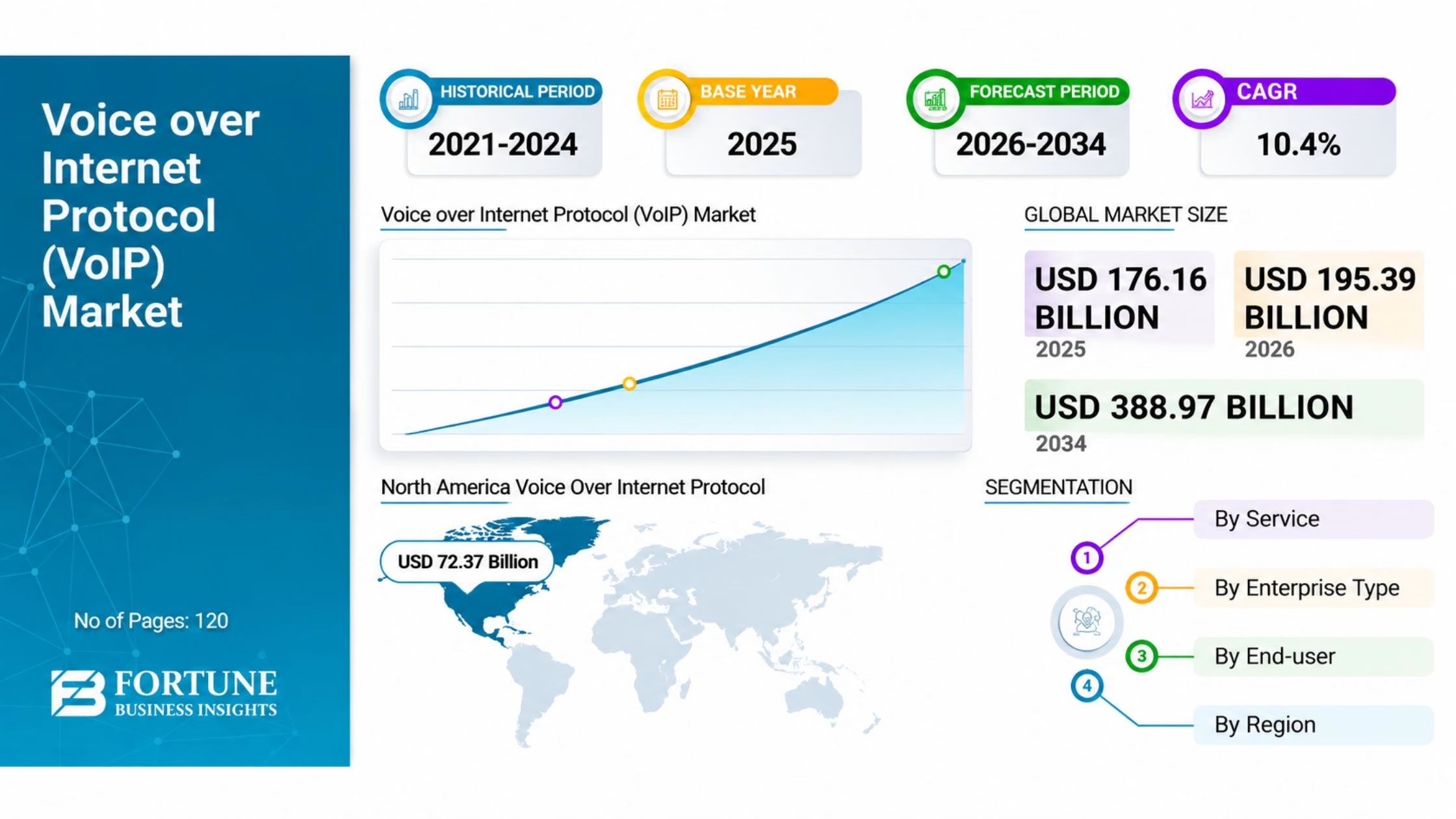
It is further expected to grow to nearly $388 billion to $415 billion by 2034, with a projected CAGR of around 10.4% to 12.3%. This growth reflects the increasing demand for flexible, internet-based communication across businesses, remote teams, and mobile users.
Several factors are accelerating VoIP adoption, including potential telecommunication cost savings of 40% to 50% compared with traditional PSTN lines, the continued use of remote and hybrid work models, and broader 5G and high-speed internet availability.
AI-powered capabilities such as real-time transcription, automated call summaries, and communication analytics are also adding value to modern VoIP platforms. North America currently accounts for roughly 45% of the global VoIP market, while Asia-Pacific is experiencing rapid growth as businesses continue investing in mobile and digital infrastructure.
As this market expands, a Best SIP Softphone can provide a flexible way to make and manage internet calls through computers, smartphones, and other supported devices. SIP softphones use the Session Initiation Protocol (SIP) to establish communication with compatible VoIP services, reducing dependence on traditional desk phones.
However, different applications vary in SIP compatibility, security, device support, call management, and collaboration features. Understanding these differences helps individuals and businesses choose a solution that fits their communication needs and workflow.
What is a SIP Softphone?
A SIP softphone is a software application that lets users make and receive voice or video calls over the internet using the Session Initiation Protocol (SIP). It turns a computer, smartphone, or tablet into a virtual phone, eliminating the need for a traditional desk phone.
Users can connect the application to a SIP account from a compatible VoIP provider and manage calls over the internet using a headset, microphone, or the device’s built-in audio.
SIP softphones can support features such as call transfer, call forwarding, voicemail, contact management, messaging, presence, and video calling, depending on the application and service provider.
Because many SIP clients can connect with different compatible VoIP services and PBX systems, they offer flexibility for individuals and businesses. A voip service with softphone support can therefore provide a convenient communication setup without requiring dedicated phone hardware.
How Does a SIP Softphone Work?
A SIP softphone combines SIP signaling, VoIP call routing, audio and video codecs, network connectivity, account registration, and RTP media transmission to establish and manage internet-based calls.
When a user makes a call, the softphone communicates with a SIP server to identify the account, locate the destination, negotiate the required media settings, and establish a connection.
In business environments, calls can also be directed through automated systems such as IVR software development, which helps route callers to the appropriate department or service. Once the session is active, the connected endpoints transmit voice or video over the internet.
SIP Signaling and Call Initiation
SIP signaling controls how a communication session starts, is managed, and ends. When a user enters a number and initiates a call, the softphone sends a SIP request to the configured SIP server or PBX. The server identifies the destination and exchanges signaling messages with the receiving endpoint to establish the call.
VoIP Call Routing and Connection
After the call is initiated, the SIP infrastructure determines how the call should reach the intended recipient. Depending on the configuration, the call may be routed through a VoIP provider, IP-PBX, SIP server, or another SIP endpoint. The routing process connects the caller and recipient while applying the rules configured by the service or business phone system.
Audio and Video Codec Processing
Before media transmission begins, the softphone negotiates suitable audio and video codecs with the other endpoint. Codecs compress and decompress media so it can be transmitted efficiently over an internet connection. Common choices include G.711, G.729, Opus, and H.264, with the final selection depending on device compatibility, network conditions, and service configuration.
NAT Traversal and Network Connectivity
Many devices operate behind routers or firewalls that use Network Address Translation (NAT), which can complicate direct SIP and media connections. Softphones and VoIP systems may use technologies such as STUN, TURN, or ICE to identify reachable network paths and establish communication. Proper NAT traversal helps reduce issues such as one-way audio, failed calls, or dropped connections.
SIP Account Registration
Before making or receiving calls, the softphone generally registers with a SIP server using credentials supplied by the VoIP provider or PBX administrator. Registration associates the SIP account with the user’s current device and network location, allowing incoming calls to reach the correct endpoint. The registration is periodically refreshed to keep the account available.
RTP-Based Audio and Video Transmission
Once the SIP session is established, RTP (Real-time Transport Protocol) carries the actual voice and video data. Unlike SIP, which handles signaling, RTP transports media packets between endpoints during the call. The softphone continuously sends and receives these packets, decodes them using the negotiated codecs, and converts them into the audio or video the user hears or sees during the conversation.
Build Your Custom SIP Solution
Turn your VoIP communication ideas into a scalable SIP softphone solution with the right features, integrations, and security for your business.
10 Best SIP Softphones to Consider
Choosing the right SIP softphone depends on factors such as operating system support, SIP compatibility, call quality, security, mobility, and the features required for personal or business communication.
The following options cover different use cases, from lightweight desktop clients to full-featured business communication platforms.
Zoiper 5
Zoiper 5 is a popular SIP client designed for desktop and mobile users who want to connect their devices to compatible VoIP services. It supports voice and video calling, multiple accounts, instant messaging, and a range of audio codecs, making it suitable for both individual users and business communication.
The application is available on major platforms and offers flexible configuration for different SIP providers. Its interface is relatively straightforward, while advanced features such as encryption, call transfer, and account management make it a practical choice for users looking for the best softphone software with broad SIP compatibility.
Linphone
Linphone is an open-source SIP softphone that supports voice and video communication across desktop and mobile platforms. It uses SIP for signaling and can support features such as instant messaging, file sharing, group calls, and encrypted communications, depending on the configuration.
Its open-source nature makes it particularly useful for developers and organizations that value transparency and customization. Linphone can work with standard SIP infrastructure rather than limiting users to a single proprietary communication ecosystem.
MicroSIP
MicroSIP is a lightweight Windows-based SIP client designed for users who need a simple application for internet calling. It supports multiple SIP accounts, HD audio, call transfer, call recording, and common VoIP codecs without requiring a resource-intensive interface.
Because of its compact design and low system requirements, MicroSIP can be useful for businesses deploying SIP calling across Windows computers. It is especially suited to users who prioritize essential calling functionality over extensive collaboration features.
Bria (Solo/Teams)
Bria, developed by CounterPath, provides SIP-based communication solutions for individual users and teams. Depending on the edition, it can support voice and video calls, messaging, presence, contact management, and integration with business communication services.
Bria is designed for professional communication workflows, making it suitable for organizations that need more than basic SIP calling. Its availability across desktop and mobile devices also helps employees maintain access to business communications while working from different locations.
3CX Softphone
The 3CX softphone is designed to work closely with the 3CX business phone system, letting users handle calls on computers and mobile devices. It supports features such as extension-based calling, call transfer, presence, video communication, and business messaging.
Its strongest advantage is its integration with the wider 3CX ecosystem. Organizations already using a 3CX phone system can provide employees with a consistent communication experience without relying on separate physical desk phones for every user.
Grandstream Wave
Grandstream Wave is a SIP softphone application designed for Android and iOS devices. It lets users configure SIP accounts and make or receive VoIP calls on mobile devices, with support for features such as call transfer, conferencing, and multiple SIP accounts.
It can be particularly useful for users who need mobile access to a business VoIP system. When paired with compatible Grandstream infrastructure or another SIP-compatible provider, the application can provide a convenient way to extend business calling beyond the office.
Acrobits SIP Softphone / Groundwire
Acrobits offers SIP softphone applications focused on reliable mobile VoIP communication. Its SIP Softphone and Groundwire products support features such as multiple SIP accounts, push notifications, secure calling, and integration with compatible VoIP services.
These applications suit users who rely heavily on smartphones for business communication. Push notification support can help incoming calls reach mobile users without requiring the SIP application to remain continuously active in the foreground.
PhonerLite
PhonerLite is a free Windows SIP softphone designed for straightforward internet calling. It supports multiple SIP profiles, call transfer, conferencing, contacts, and several audio codecs, providing the essential functionality required for SIP-based voice communication.
Its simple interface and low resource requirements make it suitable for users who don’t need an extensive unified communications platform. It can also be configured with compatible SIP providers and private PBX systems for basic business calling.
RingCentral App
The RingCentral App is a broader business communications application that combines calling with messaging, meetings, and collaboration capabilities. Rather than functioning solely as a generic SIP client, it is designed around the RingCentral communications ecosystem and provides access to business phone features across supported devices.
It can be a strong option for organizations looking for an integrated communication platform rather than a standalone SIP application. Users can move between desktop and mobile environments while maintaining access to business calling, messaging, meetings, and collaboration tools.
Sipnetic
Sipnetic is an Android SIP client focused on internet-based voice communication and compatibility with standard SIP services. It supports features such as multiple accounts, call recording, call transfer, contacts, and various audio codecs, depending on the configuration.
Its straightforward approach suits users who primarily need SIP calling on an Android device. For businesses or individuals using a compatible VoIP provider, Sipnetic can provide essential calling functionality without the complexity of a larger unified communications platform.
Make Your Communication Smarter
We develop customized SIP and VoIP solutions that combine reliable calling, seamless connectivity, and business-focused features for modern teams.
SIP Softphone vs. Traditional Phone System: Key Differences
SIP softphones and traditional phone systems both support business communication, but they differ in how they deliver, manage, and maintain calls.
A softphone relies on software and internet connectivity, while a traditional setup generally depends on physical phones and dedicated telephony infrastructure.
| Key Difference | SIP Softphone | Traditional Phone System |
|---|---|---|
| Calling Infrastructure | Uses SIP and internet-based IP networks to establish and manage calls through software. | Typically relies on physical desk phones, PSTN lines, or dedicated telephony hardware. |
| Cost and Scalability | Requires less physical hardware and can be scaled by adding users, SIP accounts, or software licenses. | Often involves hardware, installation, and maintenance costs when adding or changing users. |
| Mobility and Accessibility | Users can make and receive calls through supported computers, smartphones, or tablets from different locations. | Desk phones are generally connected to fixed locations and require additional solutions for remote access. |
| Features and Integrations | Can support video calling, messaging, presence, call recording, conferencing, and business application integrations. Big data analytics for telecom can also help businesses analyze call patterns, network performance, and customer communication data. | Features depend on the phone system and additional hardware or services that have been deployed. |
| Maintenance and Deployment | Software can generally be configured, updated, and managed remotely without replacing physical handsets. | Requires physical installation, hardware configuration, troubleshooting, and ongoing equipment maintenance. |
Essential Features of a SIP Softphone
The right SIP softphone should offer more than basic internet calling. Features such as call quality, device flexibility, security, call management, messaging, and SIP configuration can directly affect how effectively users communicate.
The following capabilities are particularly important when evaluating a softphone for personal or business use.
HD Voice and Video Calling
HD voice improves call clarity by delivering higher-quality audio when the network, codec, and service provider support it. Video calling adds face-to-face communication without requiring a separate conferencing application.
Call Transfer and Forwarding
Call transfer allows users to move an active call to another extension or number, while call forwarding redirects incoming calls to a different destination. These features are especially useful for customer support and distributed teams.
Multi-Device Support
A softphone that works across desktops, smartphones, and tablets gives users greater flexibility. Multi-device support allows employees to maintain access to business communication while moving between the office, home, and other locations.
Encryption and Call Security
Security features help protect SIP credentials, signaling, and media from unauthorized access. Options such as TLS and SRTP encryption, secure authentication, and encrypted connections can provide stronger protection for business conversations.
Voicemail and Call Recording
Voicemail ensures missed calls can still result in messages, while call recording can help with training, quality monitoring, documentation, or compliance where legally permitted. Availability and storage options vary by application and VoIP provider.
Presence, Messaging, and Chat
Presence indicators can show whether a contact is available, busy, or away, helping users decide when to call. Integrated messaging and chat can also reduce the need to switch between separate communication applications for routine conversations.
Custom SIP Account Configuration
Custom SIP configuration allows users to enter details such as the SIP server, username, password, transport protocol, and other account settings. This flexibility is valuable when connecting a softphone to different VoIP providers, hosted PBX platforms, or private SIP infrastructure.
Pros and Cons of Using SIP Softphones
SIP softphones can offer a flexible, cost-efficient alternative to traditional phone hardware, but they also depend on factors such as internet quality, device performance, and proper configuration. The main benefits and limitations include:
| Aspect | Pros | Cons |
|---|---|---|
| Cost | Reduces the need for dedicated desk phones and related hardware. | Some advanced features may require paid plans or licenses. |
| Mobility | Allows users to make and receive calls from supported computers and mobile devices. | Mobile calling can be affected by battery life and network availability. |
| Scalability | You can generally add new users by configuring SIP accounts or software licenses. | Large deployments may require centralized configuration and management. |
| Call Features | Supports features such as call transfer, forwarding, voicemail, video calling, and conferencing. | Available features vary by softphone and VoIP provider. |
| Deployment | You can install and configure software without deploying physical phone hardware. | Initial SIP, codec, firewall, or NAT configuration may require technical expertise. |
| Call Quality | Can provide clear HD voice and video when the codec and network support it. | Poor bandwidth, latency, jitter, or packet loss can reduce call quality. |
| Security | TLS, SRTP, secure authentication, and other controls can help protect communication. | Misconfigured accounts or unsecured networks can create security vulnerabilities. |
| Integration | Can connect with compatible SIP providers, PBX systems, and selected business applications. | Compatibility and integration options differ across platforms. |
How to Select the Best SIP Softphone for Your Needs?
Choosing the right SIP softphone depends on your devices, communication requirements, security expectations, and existing VoIP setup. Before selecting an option, consider these key factors:
Identify Your Operating System and Platform
Check whether the softphone supports your required platforms, such as Windows, macOS, Android, or iOS, and confirm compatibility with your SIP provider or PBX. Cross-platform support can also make deployment easier for teams using different devices.
Evaluate Mobile Battery and Push Notifications
If you rely on mobile calling, check how much battery the application consumes and whether it supports push notifications for incoming calls. Efficient background handling can help users stay reachable without keeping the softphone continuously active.
Check Security and Encryption Needs
Look for security measures such as TLS for SIP signaling, SRTP for media encryption, and secure authentication. Businesses handling sensitive conversations should also consider how the application protects SIP credentials and communication data on user devices.
Match Features to Your Workflow
Prioritize features that directly support your daily communication, such as call transfer, forwarding, voicemail, recording, video calling, messaging, presence, conferencing, and integrations. Selecting capabilities based on actual workflow needs helps avoid unnecessary complexity and costs.
Need Help Choosing the Right SIP Solution?
Our experts can help you plan and develop a SIP or VoIP solution that matches your technical requirements, users, and business objectives.
Conclusion
SIP softphones have become a practical option for businesses and individuals looking for flexible, internet-based calling without relying entirely on traditional desk phones.
From SIP signaling and RTP transmission to mobile support, encryption, call management, and integrations, the right application can provide reliable communication across different devices and locations.
The Best SIP Softphone ultimately depends on your operating system, VoIP provider, security requirements, required features, and daily workflow. Businesses planning to build, integrate, or customize VoIP communication solutions can also work with BigDataCentric to develop scalable software tailored to their specific communication requirements, whether they need SIP integration, business calling features, or broader VoIP capabilities.
FAQs
What is the best free SIP softphone for Android?
Linphone and Sipnetic are strong free options for Android users. Linphone supports SIP accounts and third-party SIP providers, while Sipnetic is a free SIP client compatible with VoIP providers and PBX systems.
Is there a free SIP provider available?
Yes. Linphone offers a free SIP service for individual users through sip.linphone.org, allowing free SIP-to-SIP audio and video calls. It does not include commercial support or a service guarantee.
Is Zoiper free to use?
Yes, Zoiper offers a free version with basic functionality for non-commercial use. Its paid versions provide additional business features such as conferencing, call transfer, encryption, and advanced integrations.
Is a sip phone better than a regular phone?
A SIP phone can be more flexible and scalable because it uses internet-based communication and can integrate with VoIP systems. A regular phone may be preferable where simplicity, traditional phone infrastructure, or consistent PSTN connectivity is the priority.
Is there an open source SIP server available?
Yes. Asterisk is a widely used open-source communications framework that can function as a SIP-based IP PBX and support VoIP gateways, call centers, IVR systems, and other telephony applications.


Jayanti Katariya is the CEO of BigDataCentric, a leading provider of AI, machine learning, data science, and business intelligence solutions. With 18+ years of industry experience, he has been at the forefront of helping businesses unlock growth through data-driven insights. Passionate about developing creative technology solutions from a young age, he pursued an engineering degree to further this interest. Under his leadership, BigDataCentric delivers tailored AI and analytics solutions to optimize business processes. His expertise drives innovation in data science, enabling organizations to make smarter, data-backed decisions.


