




Enterprise Application Integration: 8-Step Process Guide
Blog Summary:
Enterprise Application Integration connects business applications to streamline data exchange and improve operational efficiency. This guide covers EAI types, key features, benefits, implementation steps, and common challenges. Explore emerging integration trends, cost factors, and how BigDataCentric helps businesses build connected enterprise systems.
Businesses today rely on multiple applications to manage their daily operations, from customer relationship management and finance to inventory, human resources, and supply chain management.
However, when these systems operate independently, data can become fragmented, processes may slow down, and teams often spend valuable time transferring information between applications. Enterprise application integration helps businesses connect these systems, enabling smoother data exchange and more efficient workflows.
The growing need for connected business systems is reflected in the market outlook. The global Enterprise Application Integration (EAI) market is estimated to be worth USD 20.39 billion in 2026 and is projected to reach USD 41.79 billion by 2031, representing a compound annual growth rate (CAGR) of 15.42%.
This growth highlights the increasing demand for integrated software solutions that help organizations improve operational efficiency, streamline data management, and support digital transformation.
In this guide, we’ll explore what Enterprise Application Integration is, its different types, key features, business benefits, and the steps involved in implementing an effective integration solution.
We’ll also discuss common challenges, emerging trends, integration costs, and how businesses can leverage enterprise software integration to build more connected and efficient operations.
What is Enterprise Application Integration (EAI)?
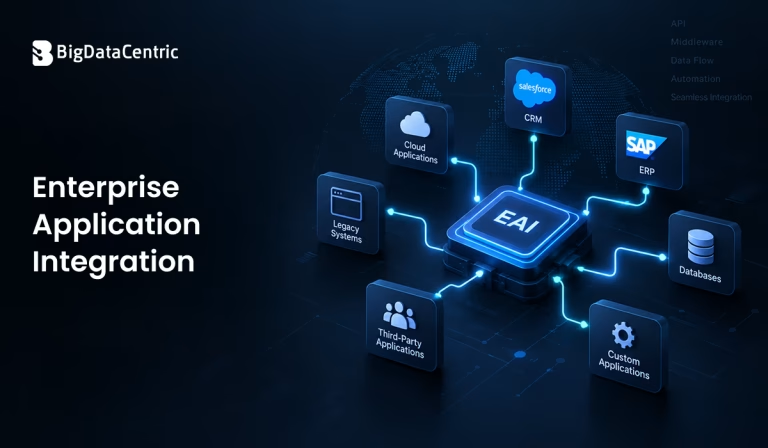
Enterprise Application Integration (EAI) is the process of connecting different business applications, systems, and databases so they can exchange data and work together seamlessly.
Instead of managing each application separately, businesses use integration technologies to create a connected environment where information can move between systems and support business processes.
For example, when a customer places an order through an e-commerce platform, the order details may need to reach the inventory management system, payment gateway, accounting software, and shipping application. EAI enables these systems to communicate, reducing the need for manual data entry and helping businesses manage operations more efficiently.
An effective application integration solution connects applications while handling differences in data formats, communication protocols, and system architectures. It can support real-time data exchange, automated workflows, and secure communication between applications, including modern cloud platforms and legacy enterprise systems.
The main goal of EAI is to create a unified technology environment where business applications can share information and support connected workflows. This allows organizations to improve visibility across departments, reduce data duplication, and build a stronger foundation for digital transformation.
Types of Enterprise Application Integration
Businesses use different integration approaches depending on their data architecture, data requirements, and operational needs. Some methods connect applications directly, while others use middleware, shared platforms, or APIs to manage communication between systems.
The following are the major types of enterprise application integration used to connect business applications and streamline data exchange.
Point-to-Point Integration
Point-to-point integration connects two applications directly so they can exchange data without relying on a central integration platform. A dedicated connection is created between the source and destination systems, allowing information to move from one application to another.
For example, a business may connect its e-commerce platform directly to its inventory management system to update stock levels whenever a customer places an order.
Key characteristics:
- Direct communication between two applications.
- Simple to implement for a small number of systems.
- Suitable for straightforward data exchange.
- Can become difficult to maintain as the number of integrations increases.
Although point-to-point integration works well for smaller environments, managing many direct connections can create a complex network of dependencies. Changes to one application may require updates to multiple integrations, increasing maintenance efforts.
Hub-and-Spoke Integration
Hub-and-spoke integration uses a central hub to connect multiple business applications. Instead of creating separate connections between every application, each system communicates with the hub, which manages data exchange and routing.
For instance, a company can connect its CRM, ERP, accounting, and inventory applications to a central integration hub. When customer or order information needs to move between systems, the hub helps deliver the data to the appropriate destination.
Key characteristics:
- Centralized communication between applications.
- Reduces the number of direct connections.
- Simplifies integration management.
- Can create dependency on the central hub.
This approach can make enterprise software integration easier to manage than a large collection of point-to-point connections. However, the central hub must be designed to handle growing workloads and avoid becoming a bottleneck or single point of failure.
Middleware-based Integration
Middleware-based integration uses software that acts as an intermediary between applications. It lets systems with different technologies, communication protocols, and data formats exchange information without communicating directly.
Middleware can handle tasks such as message routing, data transformation, authentication, and application communication.
For example, a business may use middleware to connect a legacy ERP system with a modern cloud-based CRM. The middleware receives information from one system, transforms it into a compatible format, and delivers it to the other application.
Key characteristics:
- Connects applications built with different technologies.
- Supports data transformation and message routing.
- Reduces direct dependencies between systems.
- Helps manage complex integration workflows.
Middleware is useful when organizations need to connect cloud applications, on-premises software, databases, and legacy systems.
Enterprise Service Bus (ESB) integration
Enterprise Service Bus (ESB) integration uses a centralized communication layer to connect enterprise applications and manage service and message exchange. An ESB can route messages, transform data, and coordinate communication between different systems.
For example, when a customer updates their address in a CRM, the ESB can route the updated information to billing, order management, and customer support systems.
Key characteristics:
- Supports communication between multiple enterprise applications.
- Provides message routing and transformation.
- Helps standardize communication across systems.
- Can support centralized integration governance.
ESB-based integration is commonly associated with service-oriented architectures and organizations that need to connect numerous applications through shared integration services. However, its centralized architecture may require careful planning to maintain flexibility and scalability.
Microservices Integration
Microservices integration connects independently developed and deployed services so they can work together as part of a larger business application. Each microservice typically handles a specific business capability, such as payments, customer management, or order processing.
Applications can communicate through APIs, messaging systems, or event-driven mechanisms.
For example, an online retail platform may have separate microservices for product catalogs, payments, inventory, and shipping. When a customer places an order, these services exchange information to complete the transaction.
Key characteristics:
- Connects independently deployable services.
- Supports API-based and event-driven communication.
- Allows services to scale independently.
- Encourages modular application architecture.
Microservices integration is particularly useful for modern cloud-native applications and businesses that need to develop, update, and scale different application components independently.
B2B Integration
B2B integration connects applications and systems used by different businesses to exchange information and coordinate transactions. It enables organizations to share business documents, orders, invoices, shipment details, and other operational data with suppliers, distributors, and partners.
For example, a manufacturer can connect its procurement system with a supplier’s order management platform to automate purchase orders and delivery updates.
Key characteristics:
- Connects applications across different organizations.
- Supports automated business transactions.
- Enables secure exchange of business documents.
- Can use APIs, EDI, and other communication standards.
B2B integration helps businesses reduce manual coordination with external partners and improve the speed and accuracy of supply chain operations.
Connect Your Enterprise Applications With Ease
Simplify data exchange and streamline workflows with customized integration solutions from BigDataCentric.
Key Features of an Integrated Enterprise System
An integrated enterprise system connects different business applications and enables them to share data across departments. Features such as data transformation, synchronization, and workflow coordination help organizations maintain smooth operations and reduce disconnected processes.
Data Mapping and Transformation
Data mapping and transformation allow applications with different data structures and formats to exchange information correctly. Integration tools map fields between source and destination systems and convert data into formats that the receiving application can understand.
For example, a CRM may store customer details differently from an ERP system. Data transformation ensures names, dates, product information, and other fields match the target application, improving data consistency and reducing integration errors.
Real-Time Data Synchronization
Real-time data synchronization keeps information updated across connected applications with minimal delay. When a change occurs in one system, integration tools can transfer the updated information to other relevant applications through APIs, events, or messaging systems.
For example, when a customer places an order, the inventory system can receive the details and update stock availability. This helps businesses maintain accurate information, improve operational visibility, and respond quickly to customer and business needs.
Workflow Orchestration
Workflow orchestration coordinates activities across multiple applications to complete a business process in the correct sequence. It manages how data and actions move between systems, helping ensure that each application performs its required task at the right time.
For example, an online order may involve payment processing, inventory verification, invoice generation, and shipping. Workflow orchestration connects these steps and can help manage errors, retries, and dependencies between applications.
Legacy System Bridging
Legacy system bridging connects older enterprise applications with modern software, cloud platforms, and APIs. Many organizations still use legacy systems because they contain valuable business data and support critical operational processes.
An integration layer allows these systems to communicate with newer applications without requiring immediate replacement. This helps businesses modernize gradually, extend existing software capabilities, and reduce disruption during technology upgrades.
Security and Access Control
Security and access control protect information as it moves between connected enterprise applications. Integration solutions can use authentication, authorization, encryption, and secure APIs to help prevent unauthorized access to sensitive business data.
For example, when an HR system exchanges employee information with payroll software, access controls ensure that only authorized systems and users can view or process the data. These security measures help protect business information and support compliance requirements.
Benefits of Connecting Enterprise Applications for Business Efficiency
Connecting enterprise applications helps businesses create a unified technology environment where information can move smoothly between departments.
By reducing disconnected systems and manual processes, integration improves operational efficiency, supports automation, and helps teams use business data more effectively.
Removes Data Silos
Enterprise application integration connects systems that previously operated independently, making it easier for departments to access and share relevant information.
For example, sales, finance, and inventory teams can work with connected customer and order data instead of maintaining separate records. This reduces information gaps, improves visibility across operations, and helps businesses make decisions using more consistent data.
Improves Productivity
Integrating business applications reduces the time employees spend switching between systems, searching for information, and manually transferring data. When applications communicate automatically, teams can focus more on important business activities rather than repetitive administrative tasks.
This improves workflow efficiency, supports faster collaboration, and allows employees to complete routine operations with less effort.
Prevents Human Errors
Manual data entry and repeated information transfers can lead to incorrect records, duplicate data, and missed updates. An integrated system automates information flow between applications, reducing the need for employees to enter the same details multiple times.
Data validation and transformation further help maintain consistency, minimize processing mistakes, and improve the reliability of business information.
Enables Process Automation
Connected applications make it easier to automate business workflows that involve multiple departments or systems.
For example, a new customer order can trigger inventory updates, invoice generation, and shipping activities without requiring manual coordination at every step. This reduces process delays, improves operational consistency, and helps businesses complete complex tasks more efficiently.
8-Step Process for Enterprise Application Integration
Implementing enterprise application integration requires a clear understanding of business requirements, existing systems, data flows, and technical dependencies.
A structured approach helps organizations connect applications effectively, reduce integration issues, and support long-term scalability.
Know the Enterprise
Start by understanding the organization’s business goals, departments, applications, and operational requirements. Identify which systems need to communicate, what problems the integration should solve, and how information currently moves between teams. This helps define the integration scope and ensures that the solution supports actual business needs.
Know the Data Layer
Examine how data is stored, structured, and exchanged across the applications involved in the integration. Identify databases, data formats, field relationships, and potential inconsistencies that could affect communication.
Understanding the data layer helps determine the mapping, transformation, and synchronization requirements for a reliable integration.
Make Sense of Processes
Analyze the business workflows that depend on multiple applications working together. Identify the steps, dependencies, approvals, and manual activities involved in processes such as order management, customer onboarding, or invoicing.
This allows teams to determine where integration can improve efficiency and which workflows require automation.
Identify Interfaces
Identify the APIs, web services, databases, messaging systems, and other interfaces available for connecting applications. Review each system’s communication protocols, authentication requirements, and technical limitations.
Selecting suitable interfaces helps establish reliable connections while reducing unnecessary changes to existing applications.
Know Business Events
Determine which business events should trigger data exchanges or automated actions between systems. These events may include a new customer registration, completed payment, inventory update, or shipment confirmation.
Understanding event-driven requirements helps define when information should move and which applications need to respond.
Know the Transformations
Identify the data conversions required to make information compatible across connected applications. Review differences in field names, formats, values, and business rules that may affect data exchange.
Defining these transformations in advance helps maintain data accuracy and ensures that each application receives information in the required structure.
Choose EAI Tools
Select integration tools and technologies based on the organization’s architecture, application requirements, security needs, and scalability goals. Depending on the project, this may include middleware, API management platforms, message brokers, or cloud-based integration services. The selected tools should support the required communication patterns and fit the existing technology environment.
Implement and Tune
Develop the integrations, configure data mappings, connect the required interfaces, and test the complete workflows. Monitor data exchange, identify errors, and tune performance to ensure that applications communicate reliably.
Ongoing monitoring and maintenance help address changing business requirements, improve system performance, and keep the integration environment stable.
Enhance Business Efficiency With Connected Applications
Improve workflows and reduce manual tasks with scalable enterprise integration solutions tailored to your needs.
Challenges in Enterprise Application Integration and How to Overcome Them
Connecting enterprise applications can improve business operations, but organizations may face technical, financial, and operational challenges during implementation. Understanding these challenges helps businesses plan a more reliable integration strategy and reduce disruptions.
Legacy Systems
Older applications may use outdated technologies, limited APIs, or incompatible data formats, making integration more complex. Businesses can overcome these limitations with middleware, API adapters, or gradual modernization strategies that connect legacy systems to newer applications.
Data Quality and Security
Inconsistent data, duplicate records, and security risks can affect the reliability of integrated systems. Organizations should implement data validation, transformation, encryption, and access controls to maintain accurate information and protect sensitive business data.
High Upfront Costs
Enterprise integration may require investment in software, infrastructure, development, testing, and ongoing maintenance. Businesses can manage these costs by prioritizing critical integrations, selecting suitable tools, and implementing the solution in phases based on business requirements.
Performance and Latency
Large data volumes, complex workflows, and slow system responses can affect integration performance. Businesses can improve reliability through efficient data processing, appropriate caching, asynchronous communication, and continuous performance monitoring.
Trends Shaping Enterprise Application Integration in 2026 and Beyond
As businesses adopt cloud platforms, AI, and modern software architectures, application integration is evolving to support faster data exchange and more flexible workflows. Organizations are moving beyond basic system connectivity toward intelligent automation, event-driven communication, and scalable integration frameworks.
AI-Powered and Agentic Orchestration
AI-powered integration uses machine learning and intelligent automation to improve how applications communicate and how business workflows are managed.
Agentic AI can help coordinate tasks, respond to business events, and support decisions across connected systems. These capabilities can reduce manual intervention, improve workflow efficiency, and make integration processes more adaptive.
Real-Time Event-Driven Architectures
Event-driven architectures let applications respond to business events as they occur, rather than relying only on scheduled data transfers.
For example, a payment confirmation can trigger inventory updates, invoice generation, and customer notifications. This approach supports faster data exchange, responsive workflows, and improved operational visibility across connected applications.
Universal iPaaS Adoption
Integration Platform as a Service (iPaaS) provides cloud-based tools to connect applications, manage data flows, and automate integration workflows.
Businesses can use iPaaS platforms to connect SaaS applications, APIs, databases, and on-premises systems through a centralized environment. This simplifies integration management, reduces development effort, and supports scalable enterprise software integration.
Composable and Modular Architecture
Composable architecture focuses on building applications and business capabilities from reusable, independently managed components. Integration solutions can connect these modules through APIs, events, and shared services without tightly coupling the entire system. This approach supports flexible application development, easier updates, and faster adaptation to changing business requirements.
Multi-Cloud and Hybrid Interoperability
Multi-cloud and hybrid interoperability enables applications across different cloud providers, on-premises infrastructure, and private environments to communicate effectively.
Businesses can integrate systems hosted across multiple platforms while maintaining consistent data exchange and workflow coordination. This helps organizations support flexible infrastructure strategies, improve connectivity, and manage diverse technology environments.
Cost of Enterprise Application Integration
The cost of Enterprise Application Integration depends on several factors, including the number of applications, integration complexity, development requirements, and the tools used.
Simple integrations between two applications may require less investment, while complex enterprise projects involving legacy systems, real-time data exchange, and multiple platforms may require a larger budget.
Key factors that influence integration costs include:
- Number of applications: More connected systems can increase development and maintenance efforts.
- Integration complexity: Advanced workflows, data transformation, and custom APIs may require additional development.
- Integration tools: Middleware, iPaaS platforms, and enterprise integration software may involve licensing or subscription fees.
- Security requirements: Authentication, encryption, compliance, and access controls can affect implementation costs.
- Maintenance and scalability: Monitoring, updates, troubleshooting, and future integrations contribute to ongoing expenses.
Businesses can manage costs by prioritizing essential integrations, selecting suitable tools, and implementing the solution in phases. A clear understanding of business requirements and technical dependencies helps organizations estimate the investment more accurately and avoid unnecessary development expenses.
How Can BigDataCentric Help With Enterprise Application Integration?
BigDataCentric helps businesses connect different applications, databases, and enterprise systems through customized integration solutions.
Our team focuses on understanding your business requirements, existing technology infrastructure, and workflow challenges to develop an integration approach that supports smoother data exchange and improved operational efficiency. We help organizations reduce disconnected systems and build a more connected technology environment.
From API development and middleware integration to legacy system connectivity and workflow automation, BigDataCentric provides solutions tailored to your business needs. Our approach improves communication between applications, reduces manual processes, and supports scalable enterprise software integration.
Whether you need to connect cloud applications or modernize existing systems, we can help you explore the right integration strategy for your business.
Ready to Connect Your Enterprise Applications?
Connect your business applications with secure and scalable integration solutions. Let BigDataCentric help you streamline workflows, improve data exchange, and build a more connected enterprise.
Conclusion
Enterprise Application Integration helps businesses connect applications, streamline data exchange, and improve operational efficiency. From point-to-point integration and middleware-based solutions to modern event-driven architectures, organizations can choose an approach based on their technical requirements and business goals.
A successful integration strategy reduces data silos, supports workflow automation, and enables better cross-department collaboration. By addressing challenges such as legacy systems, security, and scalability, businesses can build a more connected technology environment that supports long-term growth and enterprise digital transformation.
As integration technologies continue to evolve, businesses can explore AI-powered orchestration, cloud-based platforms, and modular architectures to improve how their applications work together. With the right integration approach and a reliable technology partner, organizations can create efficient, scalable, and future-ready enterprise systems.
FAQs
What are the four main types of enterprise applications?
The four main types are Enterprise Resource Planning (ERP), Customer Relationship Management (CRM), Supply Chain Management (SCM), and Human Resource Management (HRM). These applications support core business functions such as finance, customer management, operations, and employee administration.
What is the difference between an enterprise application and a business application?
An enterprise application supports complex business operations across departments and often integrates with multiple systems. A business application is a broader term for software that supports business tasks, including smaller tools designed for a specific team or function.
How Does EAI Improve Data Accuracy and Consistency?
EAI improves data accuracy by automating data exchange between applications and reducing repetitive manual entry. Data mapping, transformation, and validation help keep information consistent across connected systems.
What Is the Difference Between EAI and API Integration?
EAI connects multiple enterprise applications and manages data exchange, workflows, and system communication. API integration connects applications through APIs and can be used as part of an EAI solution.
Is Salesforce an enterprise application?
Yes, Salesforce is an enterprise application that provides CRM capabilities for managing customer relationships, sales, marketing, and service operations. It can integrate with ERP, finance, and other business systems through APIs and integration tools.


Jayanti Katariya is the CEO of BigDataCentric, a leading provider of AI, machine learning, data science, and business intelligence solutions. With 18+ years of industry experience, he has been at the forefront of helping businesses unlock growth through data-driven insights. Passionate about developing creative technology solutions from a young age, he pursued an engineering degree to further this interest. Under his leadership, BigDataCentric delivers tailored AI and analytics solutions to optimize business processes. His expertise drives innovation in data science, enabling organizations to make smarter, data-backed decisions.


