GitHub Actions Environment Variables: How to Use, Manage, and Secure Them

 Total View: 314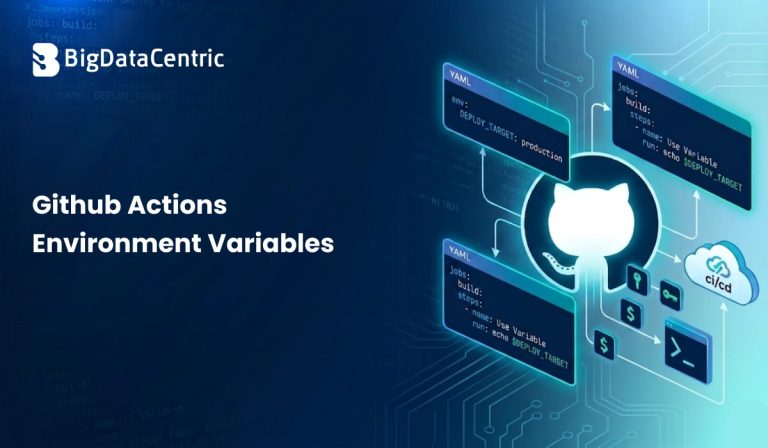
Submitting the form below will ensure a prompt response from us.
GitHub Actions is widely used for automating workflows like testing, building, and deploying applications. In these workflows, environment variables play a crucial role by storing configuration values, secrets, and dynamic data required during execution.
Understanding how to properly use environment variables in GitHub Actions helps create flexible, secure, and reusable CI/CD pipelines. It also reduces hardcoding and improves maintainability across projects, in the context of GitHub Actions Environment Variables.
What Are Environment Variables in GitHub Actions?
Environment variables in GitHub Actions are key-value pairs used to pass data into workflows. They allow you to define values that can be accessed across jobs, steps, or the entire workflow.
These variables help manage configuration settings such as API URLs, credentials, and environment-specific values. Instead of hardcoding data, environment variables provide a cleaner and more scalable approach.
Why Are Environment Variables Important?
Environment variables help make workflows dynamic and reusable across different environments. They allow developers to manage configurations without modifying workflow code repeatedly.
They also improve security by separating sensitive data from the workflow logic. This ensures that secrets and credentials are handled safely and consistently.
Improve Workflow Flexibility
Environment variables allow workflows to adapt to different environments like development, staging, and production. You can change values without modifying the workflow file.
This makes it easier to maintain and reuse workflows across multiple projects or environments.
Reduce Hardcoding
Hardcoding values directly in workflows can lead to maintenance issues. Environment variables provide a centralized way to manage these values.
This ensures consistency and reduces the risk of errors during updates, in GitHub Actions Environment Variables.
Enhance Security
Sensitive data such as API keys and tokens can be stored as secrets instead of plain text variables. This prevents exposure in logs or code.
Using environment variables with secrets ensures secure handling of critical data.
This is especially important when handling sensitive credentials in distributed systems and self-hosted LLM or API-based environments.
Types of Environment Variables in GitHub Actions
GitHub Actions supports different types of environment variables based on their scope and usage. Understanding these types helps in organizing workflows effectively.
Workflow-Level Variables
These variables are defined at the top level of a workflow and are accessible across all jobs and steps.
env:

  APP_ENV: production
They are useful for values that remain constant throughout the workflow.
Job-Level Variables
Job-level variables are defined within a specific job and are only accessible within that job.
jobs:

  build:

    env:

      NODE_ENV: development
This helps isolate configurations for different jobs.
Step-Level Variables
Step-level variables are defined for a specific step and are not shared with other steps.
steps:

  - name: Run script

    env:

      API_URL: https://api.example.com
This provides fine-grained control over variable usage.
How to Use Environment Variables in GitHub Actions?
GitHub Actions Environment Variables can be accessed within workflows using specific syntax. They are commonly used in scripts, commands, and configurations.
Access Variables in Workflow
Environment variables are accessed using the ${{ env.VARIABLE_NAME }} syntax.
steps:

  - name: Print variable

    run: echo ${{ env.APP_ENV }}
This allows you to use variables dynamically within workflows.
Use Variables in Shell Commands
Variables can also be accessed directly in shell commands depending on the environment.
echo $APP_ENV
This is useful for scripting within workflow steps.
Using Secrets as Environment Variables
GitHub provides a secure way to store sensitive data using secrets. These secrets can be used as environment variables in workflows.
Define Secrets
Secrets are stored in the repository settings and are not visible in the code.
Example:
- API_KEY
- DB_PASSWORD
Use Secrets in Workflow
Secrets can be accessed using the ${{ secrets.SECRET_NAME }} syntax.
steps:

  - name: Use secret

    run: echo ${{ secrets.API_KEY }}
This ensures that sensitive data is handled securely.
Example: Complete Workflow Using Environment Variables
Here’s a simple example demonstrating environment variables in a GitHub Actions workflow:
name: CI Pipeline

on: [push]

env:

  APP_NAME: MyApp

jobs:

  build:

    runs-on: ubuntu-latest

    env:

      NODE_ENV: production


    steps:

      - name: Checkout code

        uses: actions/checkout@v3

      - name: Print variables

        run: |

          echo "App: $APP_NAME"

          echo "Environment: $NODE_ENV"
This example shows how variables can be defined and used at different levels.
Best Practices for GitHub Actions Environment Variables
Using GitHub Actions Environment Variables is essential for maintaining secure and maintainable workflows. Applying best practices helps prevent accidental exposure of sensitive data while improving flexibility. It also ensures that workflows remain scalable and easy to manage as projects grow. A thoughtful approach to variable management enhances both security and development efficiency.
Use Secrets for Sensitive Data
Sensitive information such as API keys, tokens, and passwords should always be stored in GitHub Secrets. This prevents exposure in logs, code repositories, or workflow files. Using secrets adds an extra layer of protection for critical data, in GitHub Actions Environment Variables.
Limit Scope of Variables
In GitHub Actions Environment Variables, defining variables at the smallest necessary scope—such as step, job, or workflow—reduces the chance of misuse. It also keeps configurations cleaner and easier to understand. This approach improves both security and maintainability.
Avoid Hardcoding Values
Hardcoding values directly into workflows makes them rigid and harder to update. Using environment variables allows for easier configuration changes without modifying the code. This increases flexibility across different environments.
Rotate Secrets Regularly
In the context of GitHub Actions Environment Variables, regularly updating secrets reduces the risk of long-term exposure if credentials are compromised. Frequent rotation ensures better control over access and security. It is an important practice for maintaining a strong security posture.
Challenges of Using Environment Variables
Environment variables are powerful for configuration management, but they can introduce complications if not handled carefully. As workflows grow in size and complexity, managing these variables becomes more challenging. Without proper practices, they can lead to errors, security concerns, and maintenance difficulties. Understanding these challenges helps teams use them more effectively.
Debugging Issues
In the context of GitHub Actions Environment Variables, misconfigured or missing variables can cause unexpected failures in workflows. Since errors may not always clearly indicate the root cause, debugging can become time-consuming. Proper validation and logging can help identify issues more quickly.
Security Risks
Sensitive data stored in environment variables can be exposed if logs or access controls are not properly managed. This increases the risk of unauthorized access. Using secure storage mechanisms and restricting permissions is essential to mitigate these risks, in GitHub Actions Environment Variables.
Complexity in Large Workflows
In larger projects, managing variables across multiple jobs and steps can become difficult. Without consistent naming conventions and documentation, confusion can arise. Organizing variables properly helps maintain clarity and control.
How Bigdatacentric Helps with CI/CD Automation?
Bigdatacentric supports businesses in building efficient CI/CD pipelines using tools like GitHub Actions and modern DevOps practices. The focus is on creating secure, scalable, and automated workflows that simplify development and deployment processes.
By applying best practices for automation and environment variable management, Bigdatacentric helps organizations reduce errors, improve deployment speed, and maintain reliable software delivery.
Conclusion
Environment variables play an important role in GitHub Actions workflows by providing flexibility, improving security, and simplifying configuration management. When used correctly, they help teams build cleaner and more maintainable CI/CD pipelines.
By following best practices, developers can ensure secure and efficient automation that scales with project needs. Bigdatacentric helps organizations implement these practices effectively, enabling reliable and streamlined CI/CD workflows.


Jayanti Katariya is the CEO of BigDataCentric, a leading provider of AI, machine learning, data science, and business intelligence solutions. With 18+ years of industry experience, he has been at the forefront of helping businesses unlock growth through data-driven insights. Passionate about developing creative technology solutions from a young age, he pursued an engineering degree to further this interest. Under his leadership, BigDataCentric delivers tailored AI and analytics solutions to optimize business processes. His expertise drives innovation in data science, enabling organizations to make smarter, data-backed decisions.