How to Reverse a String in Python?

 Total View: 56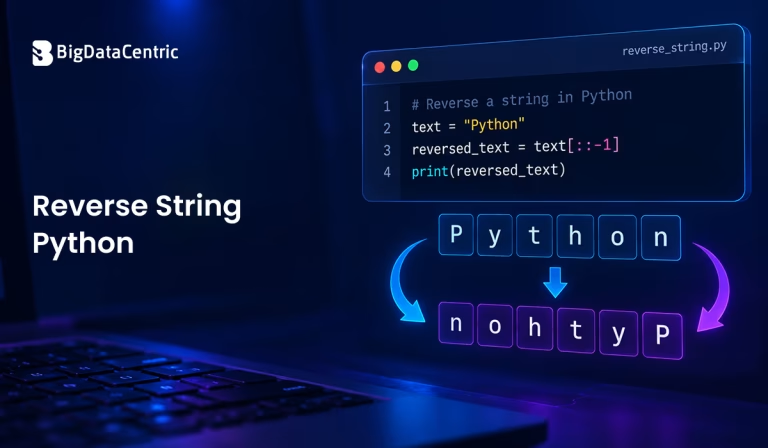
Submitting the form below will ensure a prompt response from us.
Reversing a string is a common operation in Python programming. The Reverse String Python approach can be implemented in several ways, including string slicing, the reversed() function, loops, and recursion.
Python does not provide a dedicated reverse() method for strings because strings are immutable. However, Python offers simple techniques to create a reversed version of a string.
How to Reverse a String in Python Using Slicing?
The simplest way to reverse a string in Python is by using slicing with a step of -1.
text = "Python"

reversed_text = text[::-1]

print(reversed_text)
Output:
nohtyP
The syntax [::-1] tells Python to start from the end of the string and move backward one character at a time.
This is generally the most concise approach when you simply need a reversed string.
How Does [::-1] Reverse a String?
Python slicing follows this syntax:
string[start:stop:step]
When you use:
text[::-1]
the start and stop values are omitted, while the step is set to -1.
A negative step tells Python to traverse the string from right to left.
For example:
text = "Data Science"

print(text[::-1])
Output:
ecneicS ataD
The original string remains unchanged because Python strings are immutable.
How to Reverse a String Using reversed()?
Python also provides the built-in reversed() function.
text = "Python"

reversed_text = "".join(reversed(text))

print(reversed_text)
Output:
nohtyP
The reversed() function returns an iterator that produces the characters in reverse order. Since the result is an iterator rather than a string, join() is used to construct the final string.
This approach can be useful when you want to explicitly work with the characters in reverse order.
How to Reverse a String Using Loops in Python?
You can reverse a string in Python using loops by processing its characters one at a time. Both for and while loops can be used, depending on how you want to control the iteration.
Using a For Loop
You can iterate over each character and add it to the beginning of a new string. If you want to work with both the character and its position, you can also use a Python for loop with an index.
text = "Python"

reversed_text = ""
for char in text:
reversed_text = char + reversed_text

print(reversed_text)
Output:
nohtyP
This approach is easy to understand, but repeatedly creating strings can make it less efficient for large strings. For simple string reversal, slicing is usually more concise.
Using a While Loop
A while loop can reverse a string by starting from its last character and moving toward the first.
text = "Python"

reversed_text = ""

index = len(text) - 1

while index >= 0:

reversed_text += text[index]

index -= 1

print(reversed_text)
Output:
nohtyP
This approach is useful when learning how string indexes work or when you need more control over the reversal process.
How to Reverse a String Using Recursion?
A string can also be reversed using recursion.
def reverse_string(text):

if len(text) <= 1:

return text

return reverse_string(text[1:]) + text[0]

text = "Python"

print(reverse_string(text))
Output:
nohtyP
The function repeatedly processes the string from the second character onward and places the first character at the end.
Although recursion demonstrates how the operation works conceptually, it is usually unnecessary for simple string reversal.
How to Reverse a String Without Using Slicing?
If you want to reverse a string without using slicing, reversed() and join() provide a simple alternative:
text = "Python"

result = "".join(reversed(text))

print(result)
Another option is to use a loop:
text = "Python"

result = ""
for char in text:
result = char + result

print(result)
These approaches can be useful in programming exercises or when you intentionally avoid slicing.
How to Reverse Words in a String?
Reversing a string and reversing the order of words are different operations.
For example:
text = "Python is powerful"

reversed_words = " ".join(text.split()[::-1])

print(reversed_words)
Output:
powerful is Python
Here, the words are reversed while the characters within each word remain unchanged.
If you instead want to reverse every character:
text = "Python is powerful"

print(text[::-1])
Output:
lufrewop si nohtyP
How to Reverse a String Using a Python Function?
You can create a reusable function using slicing:
def reverse_string(text):

return text[::-1]

result = reverse_string("Data Science")

print(result)
Output:
ecneicS ataD
A function makes the operation reusable throughout an application.
For example:
words = ["Python", "Database", "Machine Learning"]for word in words:
print(reverse_string(word))
Output:
nohtyP

esabataD

gninraeL enihcaM
Which Method is Best for Reversing a String in Python?
For most situations, string slicing is the simplest and most readable solution:
text[::-1]
The reversed() function is another clean option when you want to use a reverse iterator before building the final string.
| Method | Example | Use Case |
|---|---|---|
| Slicing | text[::-1] | Simple string reversal |
| reversed() | “”.join(reversed(text)) | Reverse iterator |
| For loop | for char in text | Learning or custom logic |
| While loop | Index-based traversal | More control over indexes |
| Recursion | reverse_string(text) | Understanding recursion |
Tips for Reversing Strings in Python
- Use [::-1] for simple and concise string reversal.
- Use reversed() when an iterator is useful.
- Remember that Python strings are immutable.
- Use join() when converting reversed characters into a string.
- Do not confuse reversing characters with reversing word order.
- Avoid recursion for simple string reversal unless a specific algorithm requires it.
Build Smarter Python Solutions
Get expert help to build, improve, and maintain reliable Python applications tailored to your business needs.
Final Thoughts
You can reverse a string in Python in several ways, but string slicing with [::-1] is usually the simplest approach. Python also provides the reversed() function for iterating through characters in reverse order.
For more complex requirements, you can use loops or recursion to demonstrate or customize the reversal process. Understanding these techniques helps developers work more effectively with strings and Python’s indexing and iteration features.


Jayanti Katariya is the CEO of BigDataCentric, a leading provider of AI, machine learning, data science, and business intelligence solutions. With 18+ years of industry experience, he has been at the forefront of helping businesses unlock growth through data-driven insights. Passionate about developing creative technology solutions from a young age, he pursued an engineering degree to further this interest. Under his leadership, BigDataCentric delivers tailored AI and analytics solutions to optimize business processes. His expertise drives innovation in data science, enabling organizations to make smarter, data-backed decisions.