How Does Python String Interpolation Work?

 Total View: 63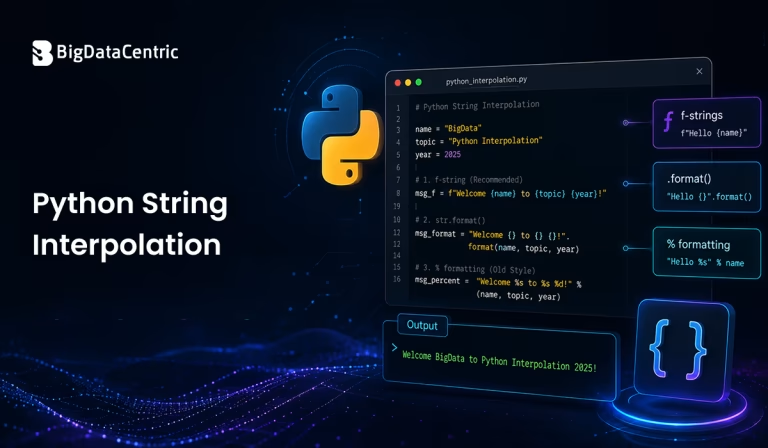
Submitting the form below will ensure a prompt response from us.
Python string interpolation is the process of inserting variables, values, or expressions directly into a string. It is commonly used when generating messages, reports, logs, dynamic HTML, file paths, and application output.
Python provides several ways to perform string interpolation. Modern Python code generally uses f-strings, introduced in Python 3.6, because they are concise, readable, and support expressions directly inside strings.
For example:
name = "Alex"

language = "Python"

message = f"{name} is learning {language}."

print(message)
Output:
Alex is learning Python.
Here, {name} and {language} are replaced with the values stored in those variables.
Other approaches include the str.format() method, old-style % formatting, and the string.Template class. Understanding these options helps developers choose the appropriate technique for different Python applications.
What is String Interpolation in Python?
String interpolation is the process of dynamically creating a string by combining fixed text with variable values or calculated expressions.
Without interpolation, you might write:
name = "Alex"

message = "Hello, " + name + "!"
With an f-string, the same operation becomes:
name = "Alex"

message = f"Hello, {name}!"
Output:
Hello, Alex!
The second approach is generally easier to read, especially when multiple variables need to be included.
How to Perform String Interpolation in Python?
Python String Interpolation Using f-Strings
F-strings are the most common modern approach to string interpolation in Python.
The syntax is:
f"text {variable}"
For example:
product = "Laptop"

price = 850

message = f"The {product} costs ${price}."

print(message)
Output:
The Laptop costs $850.
The f before the opening quotation mark tells Python that the string is an f-string.
Interpolating Multiple Variables
You can include multiple variables in the same string:
name = "Alex"

role = "Developer"

experience = 5

message = f"{name} is a {role} with {experience} years of experience."

print(message)
Output:
Alex is a Developer with 5 years of experience.
This makes f-strings particularly convenient for dynamically generated text.
Using Expressions Inside f-Strings
One advantage of f-strings is that you can place Python expressions inside the curly braces.
price = 120

quantity = 4

message = f"Total: ${price * quantity}"

print(message)
Output:
Total: $480
You can also use functions or methods when appropriate:
name = "alex"

message = f"User: {name.upper()}"

print(message)
Output:
User: ALEX
This makes f-strings more powerful than simple variable substitution.
Formatting Numbers with Python String Interpolation
F-strings support format specifications for controlling how values are displayed.
For example, you can format a floating-point number to two decimal places:
price = 1299.5678

message = f"Price: ${price:.2f}"

print(message)
Output:
Price: $1299.57
The .2f specifies that the number should be formatted as a floating-point value with two decimal places.
Formatting Percentages
completion = 0.875

message = f"Completion: {completion:.1%}"

print(message)
Output:
Completion: 87.5%
This is useful when generating reports or displaying calculated values.
Using str.format() for String Interpolation
Before f-strings were introduced, str.format() was a popular way to insert values into strings.
name = "Alex"

language = "Python"

message = "{} is learning {}.".format(name, language)

print(message)
Output:
Alex is learning Python.
You can also use named placeholders:
message = "{name} is learning {language}.".format(

name="Alex",

language="Python"

)

print(message)
Output:
Alex is learning Python.
Although format() is still supported and useful, f-strings are usually more concise for straightforward interpolation.
Python String Interpolation Using % Formatting
Python also supports the older % formatting syntax.
name = "Alex"

experience = 5

message = "%s has %d years of experience." % (name, experience)

print(message)
Output:
Alex has 5 years of experience.
Here:
- %s represents a string.
- %d represents an integer.
This method is considered legacy for most new code. Existing Python applications may still contain it, so developers should understand how it works.
Using string.Template for Interpolation
Python’s string module provides the Template class for another approach to string interpolation.
from string import Template

template = Template("Hello, $name!")

message = template.substitute(name="Alex")

print(message)
Output:
Hello, Alex!
You can also use safe_substitute() when missing placeholders should not immediately raise an exception:
from string import Template

template = Template("Hello, $name. Your role is $role.")

message = template.safe_substitute(name="Alex")

print(message)
Output:
Hello, Alex. Your role is $role.
Template can be useful when templates need a simpler substitution syntax or when the template itself needs to be separated from the Python code.
Which Python String Interpolation Method Should You Use?
Different techniques are appropriate for different situations.
| Method | Recommended Use | Key Benefit |
|---|---|---|
| f-strings | Modern Python code and general interpolation | Concise syntax and easy-to-read expressions |
| str.format() | Existing code or more complex formatting patterns | Flexible placeholder and formatting options |
| % formatting | Maintaining legacy Python code | Useful for working with older Python applications |
| string.Template | Template-based substitution and simpler placeholder handling | Simple placeholder syntax and template separation |
For most new Python applications, f-strings are the preferred choice.
How to Use Python String Interpolation in Different Situations?
How to Interpolate Values in a Loop?
String interpolation is frequently used when generating dynamic output in Python for loops.
users = ["Alex", "Jordan", "Taylor"]

for user in users:

message = f"Welcome, {user}!"

print(message)
Output:
Welcome, Alex!

Welcome, Jordan!

Welcome, Taylor!
This approach is useful for generating dynamic messages, reports, logs, or other text-based output.
How to Use Conditional Expressions in f-Strings?
Python allows expressions such as conditional expressions inside f-strings.
score = 85

message = f"Result: {'Pass' if score >= 50 else 'Fail'}"

print(message)
Output:
Result: Pass
Although this is convenient, very complicated logic should generally be calculated before the string is constructed. Keeping the interpolation expression simple improves readability.
For example:
score = 85

result = "Pass" if score >= 50 else "Fail"

message = f"Result: {result}"

print(message)
How to Interpolate Dictionary Values?
F-strings can also access dictionary values.
employee = {

"name": "Alex",

"role": "Developer"

}

message = f"{employee['name']} works as a {employee['role']}."

print(message)
Output:
Alex works as a Developer.
For nested dictionaries, you can access deeper values as required:
employee = {

"name": "Alex",

"department": {

"name": "Engineering"

}

}

message = f"{employee['name']} works in {employee['department']['name']}."

print(message)
Output:
Alex works in Engineering.
How to Interpolate Dates and Times?
F-strings can format date and time objects using format specifications.
from datetime import datetime

today = datetime.now()

message = f"Date: {today:%Y-%m-%d}"

print(message)
A possible output is:
Date: 2026-08-31
This is useful when creating dynamic reports, filenames, log messages, and status information.
Can You Call Functions in an f-String?
Yes. Function calls can be included inside f-string expressions.
def get_status():

return "Active"

message = f"Account status: {get_status()}"

print(message)
Output:
Account status: Active
However, avoid putting complicated business logic inside an f-string. It is generally clearer to calculate complex values separately and then interpolate the result.
Python String Interpolation and Escaping Curly Braces
F-strings use {} to identify expressions. If you need to display literal curly braces, double them.
name = "Alex"

message = f"User: {name}, object format: {{name}}"

print(message)
Output:
User: Alex, object format: {name}
Here, {{ and }} produce literal curly braces.
What is the Difference Between String Concatenation and Interpolation?
String concatenation and string interpolation both allow developers to create dynamic strings, but they work differently.
With concatenation:
name = "Alex"

message = "Hello, " + name + "!"
With interpolation:
name = "Alex"

message = f"Hello, {name}!"
Both produce:
Hello, Alex!
However, interpolation can be easier to read when a string contains multiple variables.
For example:
name = "Alex"

role = "Developer"

company = "Tech Solutions"

message = f"{name} is a {role} at {company}."
This is generally more readable than chaining multiple + operators.
Common Mistakes in Python String Interpolation
Forgetting the f Prefix
This code does not interpolate the variable:
name = "Alex"

message = "Hello, {name}"

print(message)
Output:
Hello, {name}

Add the f prefix:

message = f"Hello, {name}"

print(message)
Output:
Hello, Alex
Using the Wrong Quotes Inside Expressions
When accessing dictionary values inside an f-string, be careful with quotation marks.
For example:
employee = {"name": "Alex"}

message = f"Employee: {employee['name']}"

print(message)
Using different quote types for the outer string and dictionary key makes the expression easier to read.
Performing Excessive Logic Inside an f-String
Avoid turning an f-string into a large expression containing complex business logic.
Instead of embedding complicated calculations, calculate the value first:
price = 250

quantity = 4

total = price * quantity

message = f"Total cost: ${total}"

print(message)
This keeps the code easier to understand and maintain.
Python String Interpolation Best Practices
Prefer f-Strings for Modern Python
In Python 3.6 and later, f-strings are generally the clearest way to insert variables and expressions into strings.
Keep Expressions Simple
Although f-strings support expressions, avoid putting complex application logic inside them.
Use Format Specifications When Needed
Take advantage of formatting features for numbers, dates, percentages, and other values.
Choose Template Tools for User-Controlled Templates
If users or external systems provide templates, consider whether string.Template or another appropriate templating solution better fits the application’s requirements.
Avoid Mixing Multiple Formatting Styles
For new code, consistently using f-strings can make a codebase easier to read. Legacy applications may require other formatting approaches for compatibility.
Need Expert Python Development?
From application development and automation to AI-powered solutions, we deliver reliable Python software designed around your business requirements.
Conclusion
Python string interpolation provides a convenient way to combine text with variables, expressions, and formatted values. Python supports several approaches, including f-strings, str.format(), % formatting, and string.Template.
For modern Python development, f-strings are generally the preferred option because they provide concise syntax and allow variables and expressions to be placed directly inside a string.
For example:
name = "Alex"

experience = 5

message = f"{name} has {experience} years of experience."

print(message)
Output:
Alex has 5 years of experience.
While older techniques such as % formatting and str.format() remain relevant when working with existing codebases, understanding all the available approaches allows developers to select the right method for their particular requirements.


Jayanti Katariya is the CEO of BigDataCentric, a leading provider of AI, machine learning, data science, and business intelligence solutions. With 18+ years of industry experience, he has been at the forefront of helping businesses unlock growth through data-driven insights. Passionate about developing creative technology solutions from a young age, he pursued an engineering degree to further this interest. Under his leadership, BigDataCentric delivers tailored AI and analytics solutions to optimize business processes. His expertise drives innovation in data science, enabling organizations to make smarter, data-backed decisions.